


Razer Kraken V3 HyperSense Review – Sign of an Immersive Future
-
Appearance - 8.5/10
8.5/10
-
Features - 7.5/10
7.5/10
-
Materials - 7.5/10
7.5/10
-
Performance - 7.5/10
7.5/10
-
Portability - 5.5/10
5.5/10
-
User Experience - 7/10
7/10
-
Value - 7.5/10
7.5/10
Summary
The Razer Kraken V3 HyperSense is a solid gaming headset that gives us a glimpse of something greater coming in the future.
Overall
7.3/10Pros
+ Compatible with a decent variety of devices
+ Haptic feedback system adds a layer of immersion
+ Balanced audio with bass not overpowering other sounds
+ Onboard controls
+ Decent mic
+ Comfortable to use
Cons
– It can get rather warm not long after use
– The novelty of the vibrations wear out rather quickly
– Can’t use with mobile devices
– Ear cups can’t fold so it’s not so portable
Unboxing the Razer Kraken V3 HyperSense

Let’s kick off the Razer Kraken V3 HyperSense review with the unboxing. The box itself is your standard issue Razer gaming peripheral packaging, clad in its signature green and black colour scheme. Inside it, you will be able to find the following items:
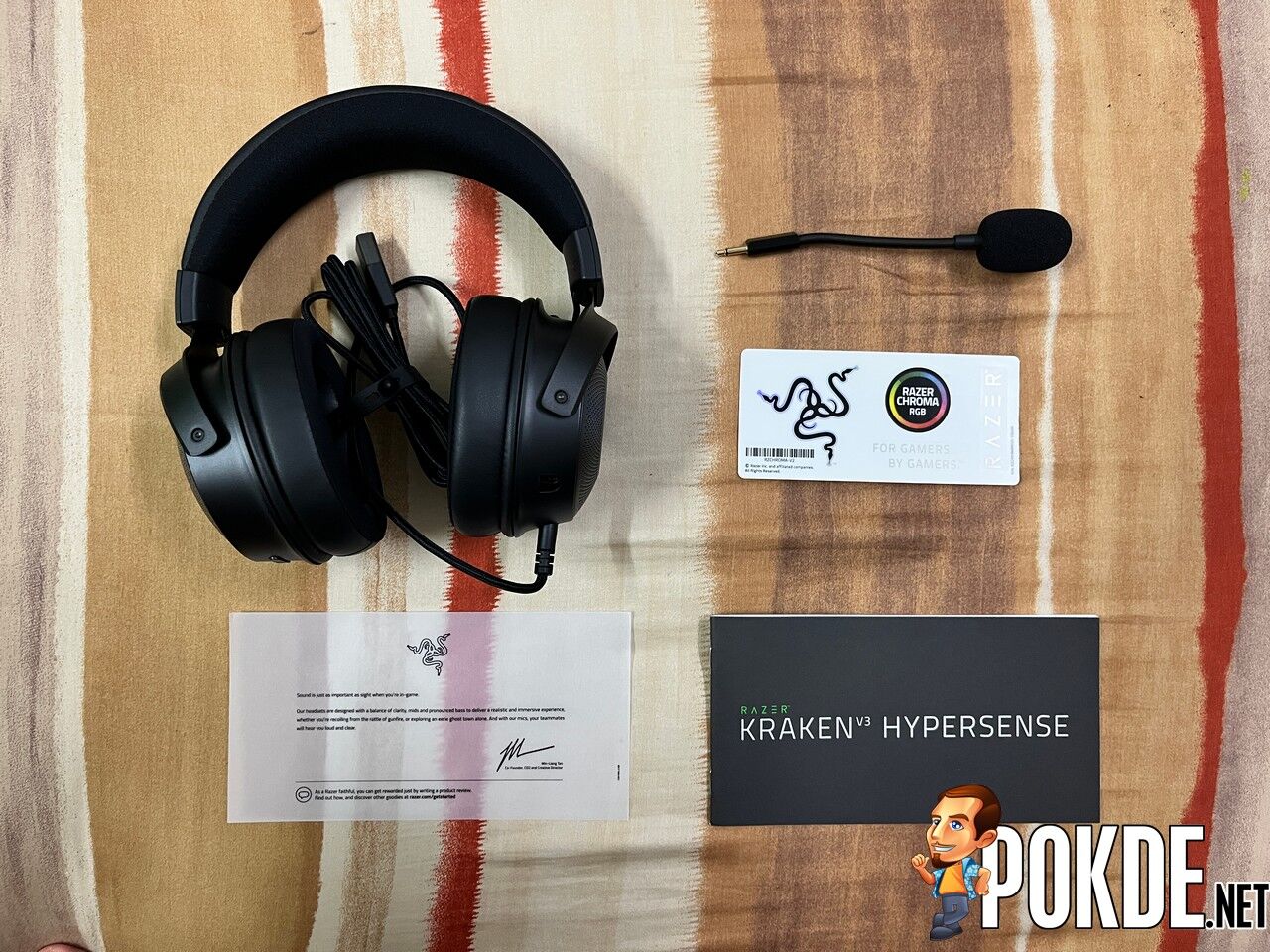
- User guide
- Welcome note by Razer CEO Min-Liang Tan
- Detachable microphone
- Razer stickers
- The Razer Kraken V3 HyperSense gaming headset itself
Appearance

The Razer Kraken V3 HyperSense essentially looks essentially the same as the Kraken V3 X, mostly because the biggest change is what’s inside. You get their signature black and green colour scheme, plush leatherette ear cushions, breathable headband cushion, and side plates with the triple-headed snake logo that can glow in RGB.

On the left earcup, you can find the volume rocker, microphone mute switch, non-detachable USB cable, and a port to connect the detachable microphone. As for the right earcup, you can find the Haptics Adjuster residing in solitude.
Overall, the Razer Kraken V3 HyperSense looks great for a gaming headset, with a good mix of metal and plastic for its build, and the shape follows most traditional headsets / headphones. The Razer Chroma RGB lighting is certainly a nice touch but, as I mentioned earlier, the most important is the haptic feedback system inside.
Looking for a rather affordable gaming headset that’s more suited for console gaming? Check out our review of the Razer Kraken X for Console by clicking right here.
Specifications
| Frequency Response | 20Hz – 20kHz |
| Impedance | 32 Ω (1 kHz) |
| Sensitivity | 96 dBSPL / mW @ 1 KHz (HATS) |
| Connectivity | USB-A |
| Cable | 2m Razer Speedflex Cable |
| Drivers | Razer TriForce Titanium 50mm Drivers Titanium-coated diaphragm |
| Noise Cancelation | Passive |
| Microphone | Razer HyperClear Cardioid Mic Noise-canceling 6mm Removable mic Advanced mic control features |
| Isolation | Advanced passive noise cancellation |
| Earcup | Heat-Transfer Fabric / Leatherette / Memory Foam |
| RGB | Yes, Razer Chroma |
| Audio Technology | Razer HyperSense haptic technology THX Spatial Audio Advanced audio control features |
| Weight | 344g |
User Experience
Connecting to Devices

The Razer Kraken V3 HyperSense only has one connectivity option, and that is via USB. This means that it’s compatible with PC and consoles, but not mobile. At the same time, while you can get audio via USB on consoles, you may have issues with the microphone. What we can say for sure is that it works perfectly on the PS5, but I can’t get the mic to work on the PS4.
Sound

First things first, let’s start with the sound you’re getting from the Razer Kraken V3 HyperSense. To my surprise, it’s more balanced that the previous Kraken headsets, as the bass is lesser (though far from sounding like an empty can) which results in it not drowning out the other sounds. You also have a decently wide soundstage to help distinguish location.


Adding the haptic feedback system into the fray and it gets quite interesting. The vibrations do add another layer of immersion, especially shooter games like Apex Legends and Valorant. It doesn’t need to have a specific setting for it as it supports every game and vibrates accordingly with in-game sound.

It’s especially apparently with rumbling noises and explosives in any game. The odd thing is that if the game you’re playing has music, it will also rumble accordingly with that, which can feel weird. Furthermore, the longer you use it, the more it feels like a gimmick as the novelty will wear off rather quickly.
Don’t get me wrong, it’s a great addition but in its current state, it doesn’t do that much and I wouldn’t say it’s a game-changer either. There’s plenty of room for improvement here and Razer is off to a good start. I’m more excited thinking how future products with the HyperSense technology will perform.
Comfort

The Razer Kraken V3 HyperSense has a notable weight to it, at 344g, but it’s not cumbersome. The cushions are certainly plush and comfortable, which is a major plus. One major annoyance here is that the earcups can’t rotate, nor can it be folded, which affects its portability quite a bit.
While the headset itself looks great, I would have preferred to have the ear cushions to be more breathable as it can get rather warm. The longest I wore this in a single run is 2 hours before I had to take it off. I suspect that the RGB lighting made it warmer but It’s definitely far from terrible, just that it could be further optimized. If you live in a colder country, this would not be an issue.

One thing I would like to note however is that the passive noise isolation as a result of the materials, assuming you made it fit accordingly with your head, is great. It’s not noise cancelling by any means, but this makes it a lot easier to be immersed in the games that you’re playing, with minimal interruptions at worst.
Microphone
The microphone on the Razer Kraken V3 HyperSense is pretty decent. It’s good for clear communications in games and online voice chats. If you’re expecting high quality audio however, tweaking can only do so much so it’s better to find a standalone microphone. Temper your expectations if you’re looking to make use of the microphone.
Note: by default, the audio from the microphone is a little soft so you may want to adjust the gain. The recording is done on default values.
Razer Kraken V3 HyperSense Verdict

The Razer Kraken V3 HyperSense is a solid gaming headset that gives us a glimpse of something greater coming in the future. The HyperSense haptic feedback technology is interesting, but there’s plenty of room for improvement before we can truly recommend it as something you shouldn’t miss.
For the price of RM599, it’s not overly pricey for what you’re getting but if you don’t care for the vibrations, you have plenty of other options to consider, even within Razer’s own portfolio of gaming headsets. At the end of our Razer Kraken V3 HyperSense review, I award this gaming headset with our Silver Pokdeward.

Big thanks to Razer Asia Pacific for sending us this gaming headset for the purpose of this review.


