


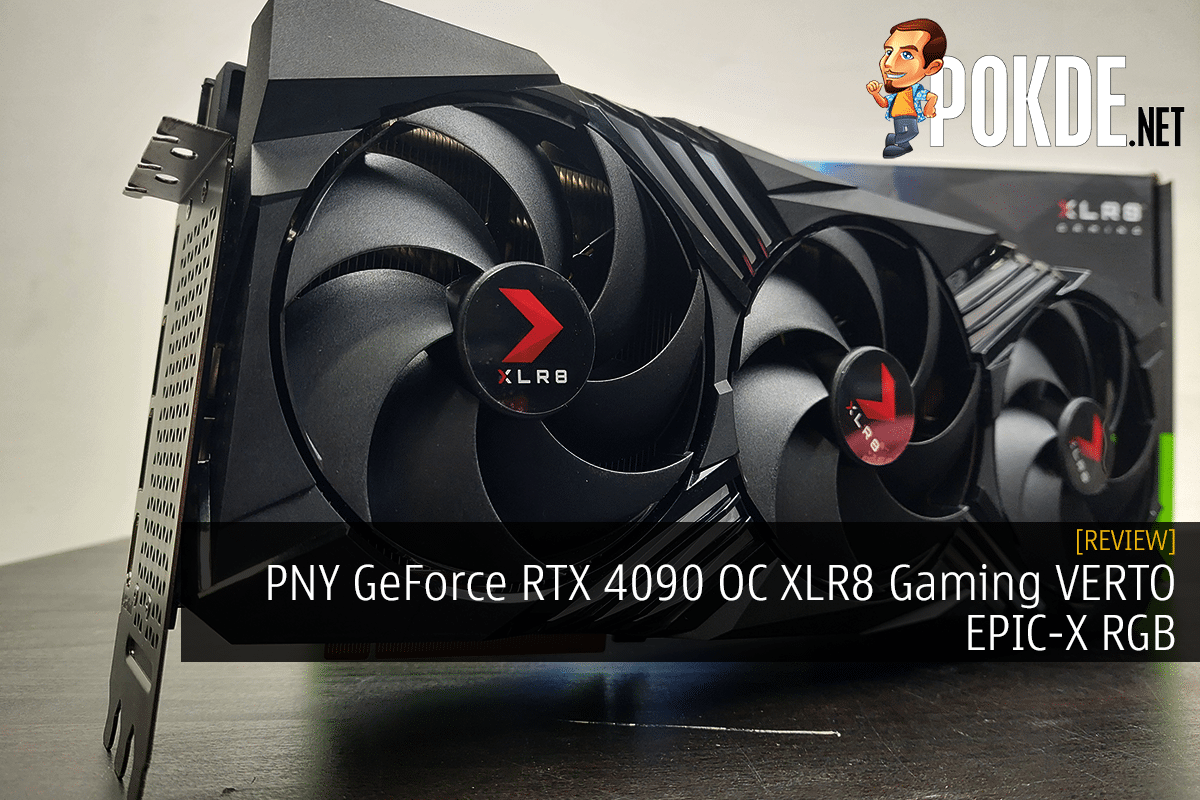
PNY GeForce RTX 4090 OC XLR8 Gaming VERTO EPIC-X RGB Review – The Silent Beast
-
Appearance - 8.2/10
8.2/10
-
Efficiency - 7.8/10
7.8/10
-
Features - 8.2/10
8.2/10
-
Materials - 8.2/10
8.2/10
-
Performance - 9/10
9/10
-
User Experience - 8.2/10
8.2/10
-
Value - 8/10
8/10
Summary
If you don’t necessarily need all the bells and whistles, the PNY GeForce RTX 4090 OC XLR8 Gaming VERTO EPIC-X RGB can serve just as well as other RTX 4090s.
Overall
8.2/10Pros
+ Impressive 4K performance
+ Very little noise even at full load
+ Well-cooled
Cons
– Pricey
– No dual-BIOS option
You should know by now how a RTX 4090 looks like – massive in size, thirsty on power, expensive in pricing, and just generally has a presence that you couldn’t ignore even if you wanted to. For the RTX 40 series, NVIDIA wants to create a generational gap so big, they have pretty much turned everything up to 11 – power limit, CUDA cores, L2 caches, and even brings a feature that literally generates frames.
While all of these sounds nice on paper, your AIB models is not going to differ very much in terms of performance or certain features, due to NVIDIA’s stringent control on how custom designs should be made (just ask EVGA). Here we have PNY’s flavor of GeForce RTX 4090 – can it differentiate itself from other AIB models? Let’s find out.
Unboxing
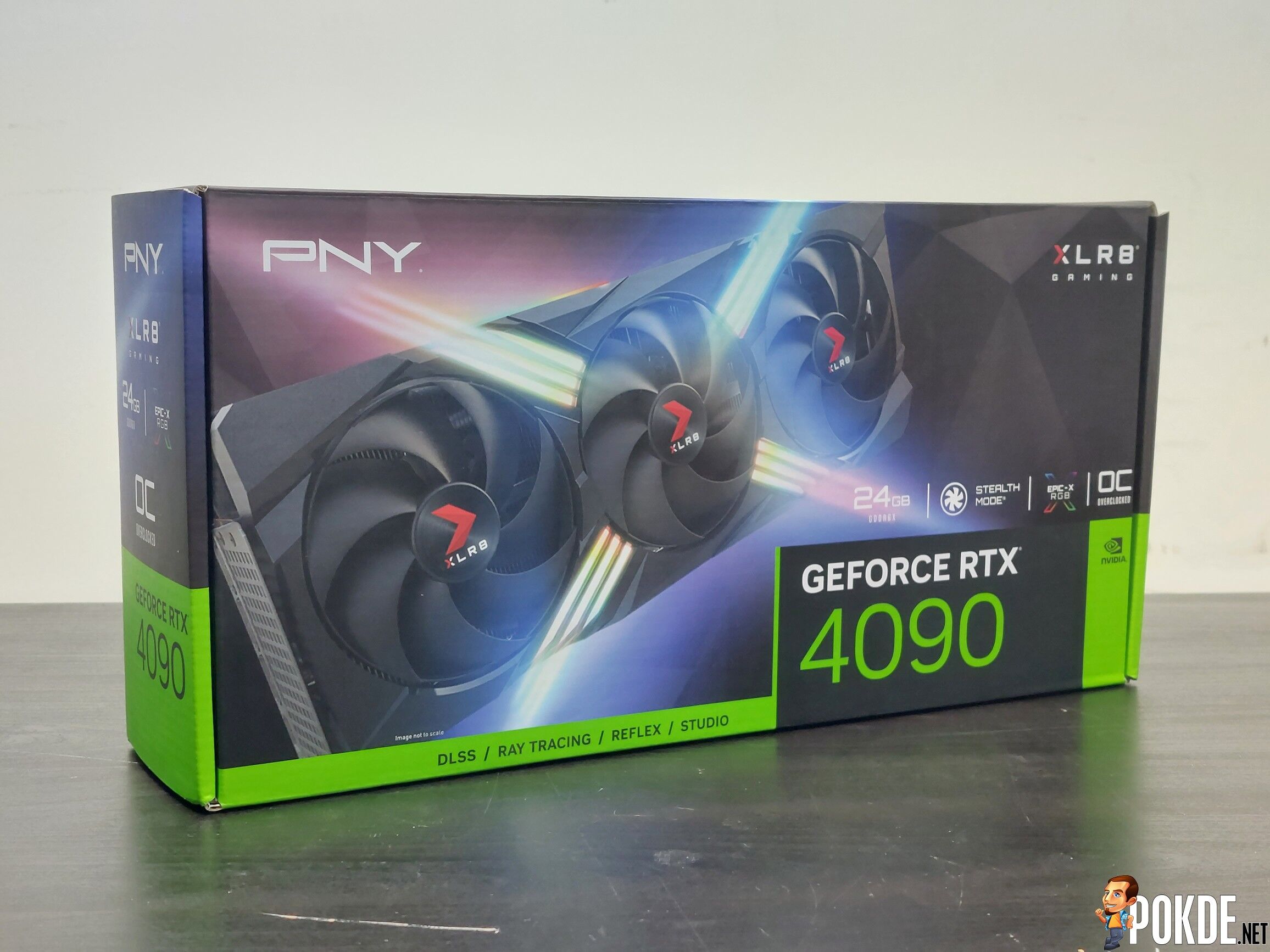
With NVIDIA’s rebranding on GeForce few months earlier, that meant all products associated with it are now using a new font called “NVIDIA Sans NALA”. Most AIB packaging these days won’t be that much different from each other – at most you’ll be looking either a render of the card itself, or sometimes just with 3D rendered images of some abstract graphics on the same spot. In this case, it’s a depiction of the card itself, with that lightshow-grade RGB effects.
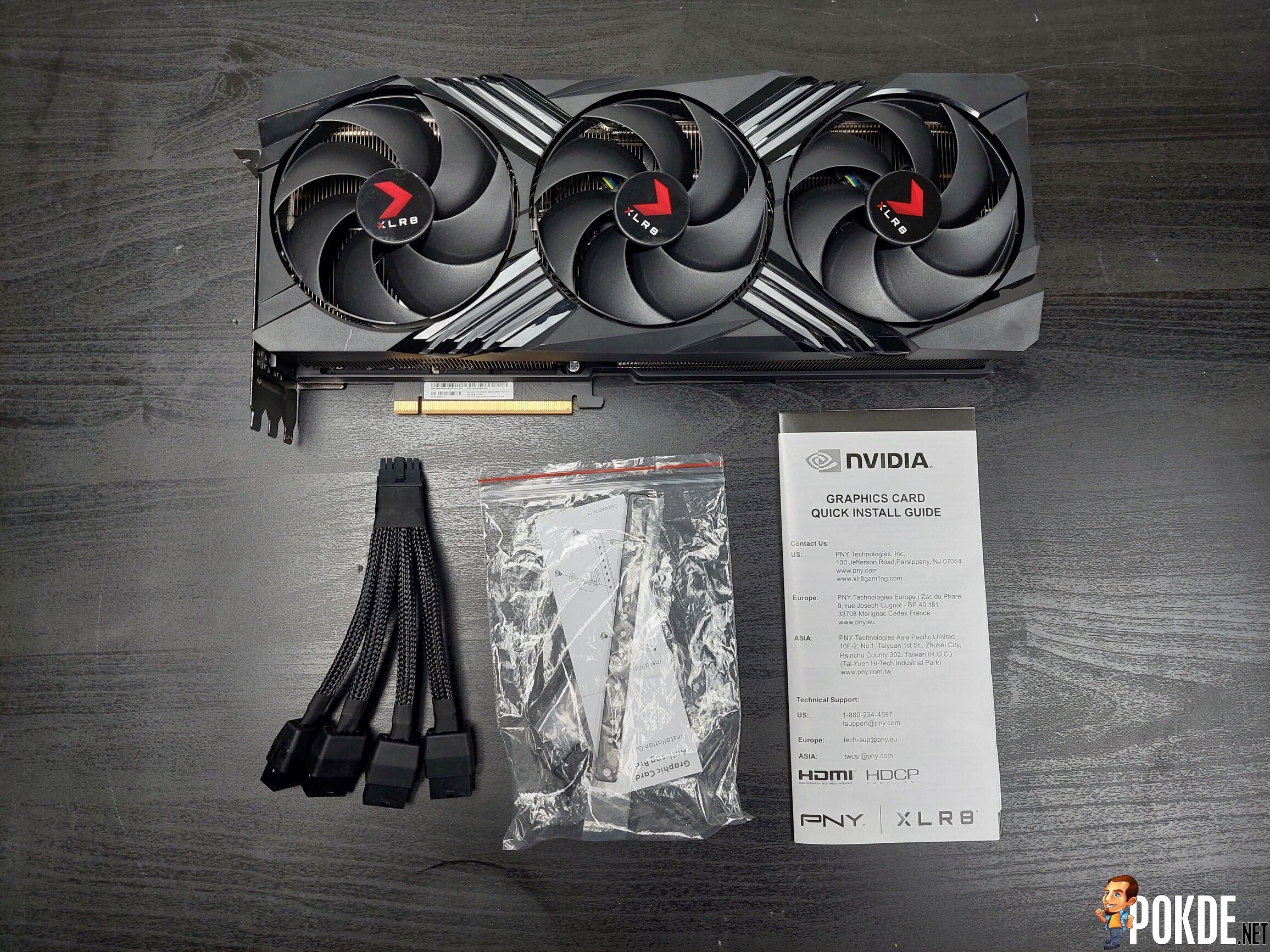
Opening the box reveals not a whole lot – the card itself, quick start guide, GPU support bracket (plus screws) and a 16-pin (12VHPWR) to 4x 8-pin PCIe adapter. If you have a PCIe 5.0 / ATX 3.0 power supply already on hand, you can ignore that adapter as it is designed for older ATX 2.0 standard PSUs that use PCIe 8-pin connectors (which supplies 150W on each connector).
Appearance
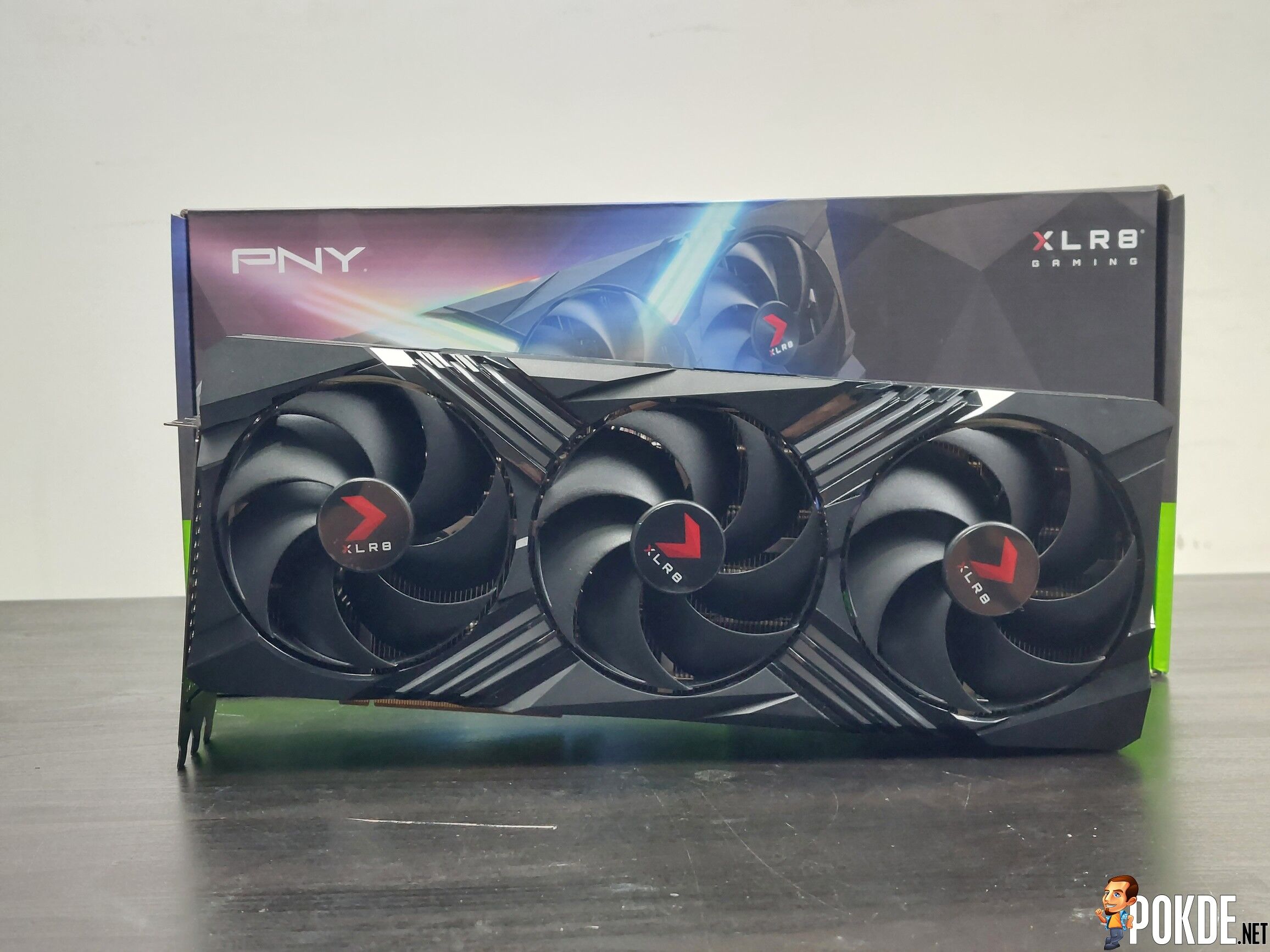
Let’s just say unless your previous GPU happened to be a RTX 3090 or either of the 3080 series, you’re going to pause for a brief moment and look at the sheer size of this thing. Three 100mm fans covers the shroud which measures the entire card at 332mm. Not the biggest card that existed so far, just so you know.
PNY has toned down the design, doing away with the two tone “metal frame” look from the 30 series and instead go for a more mainstream shroud design. That being said, you can see there’s the huge X-shape lines around the center fan which is responsible for RGB lighting.
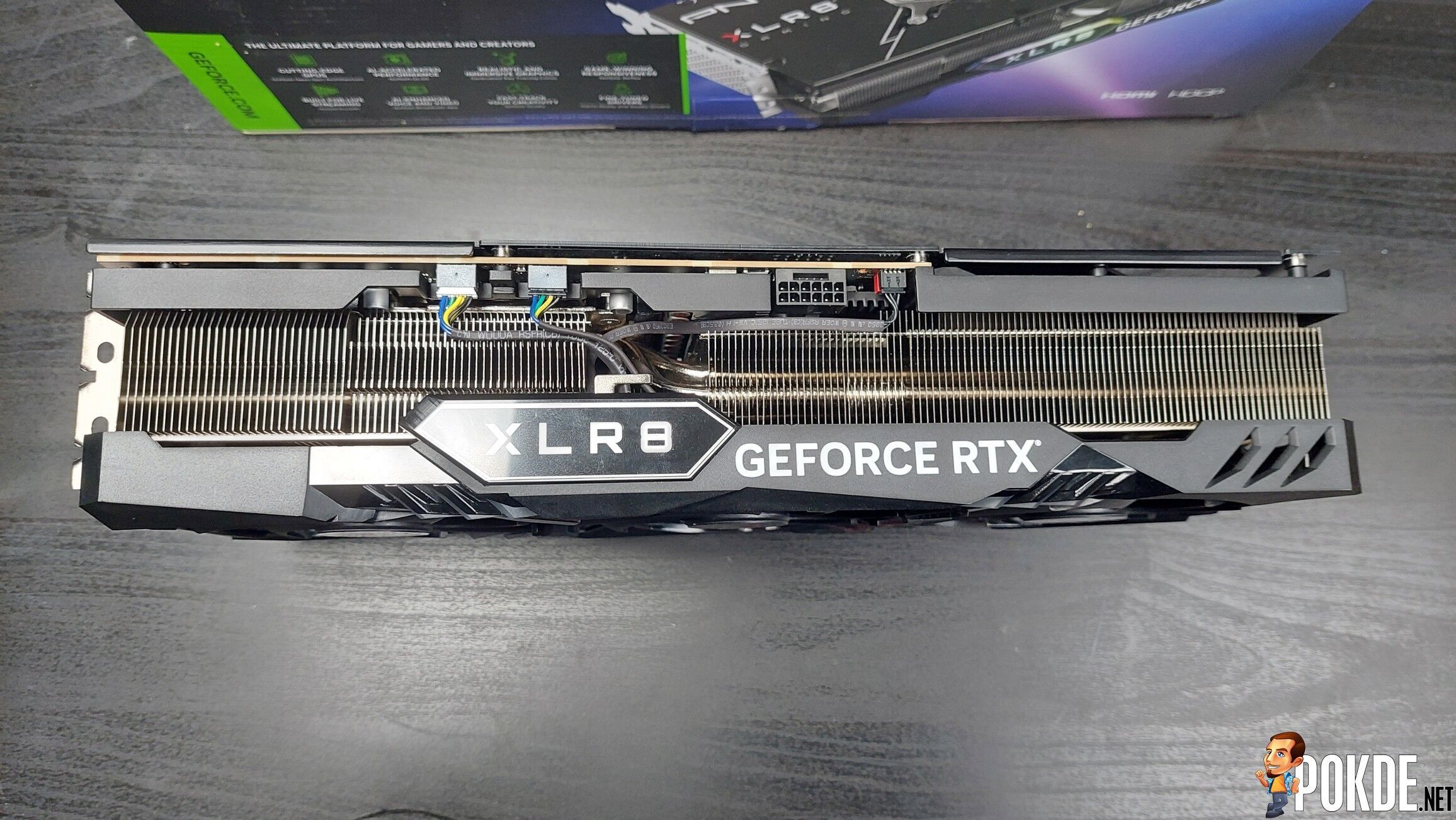
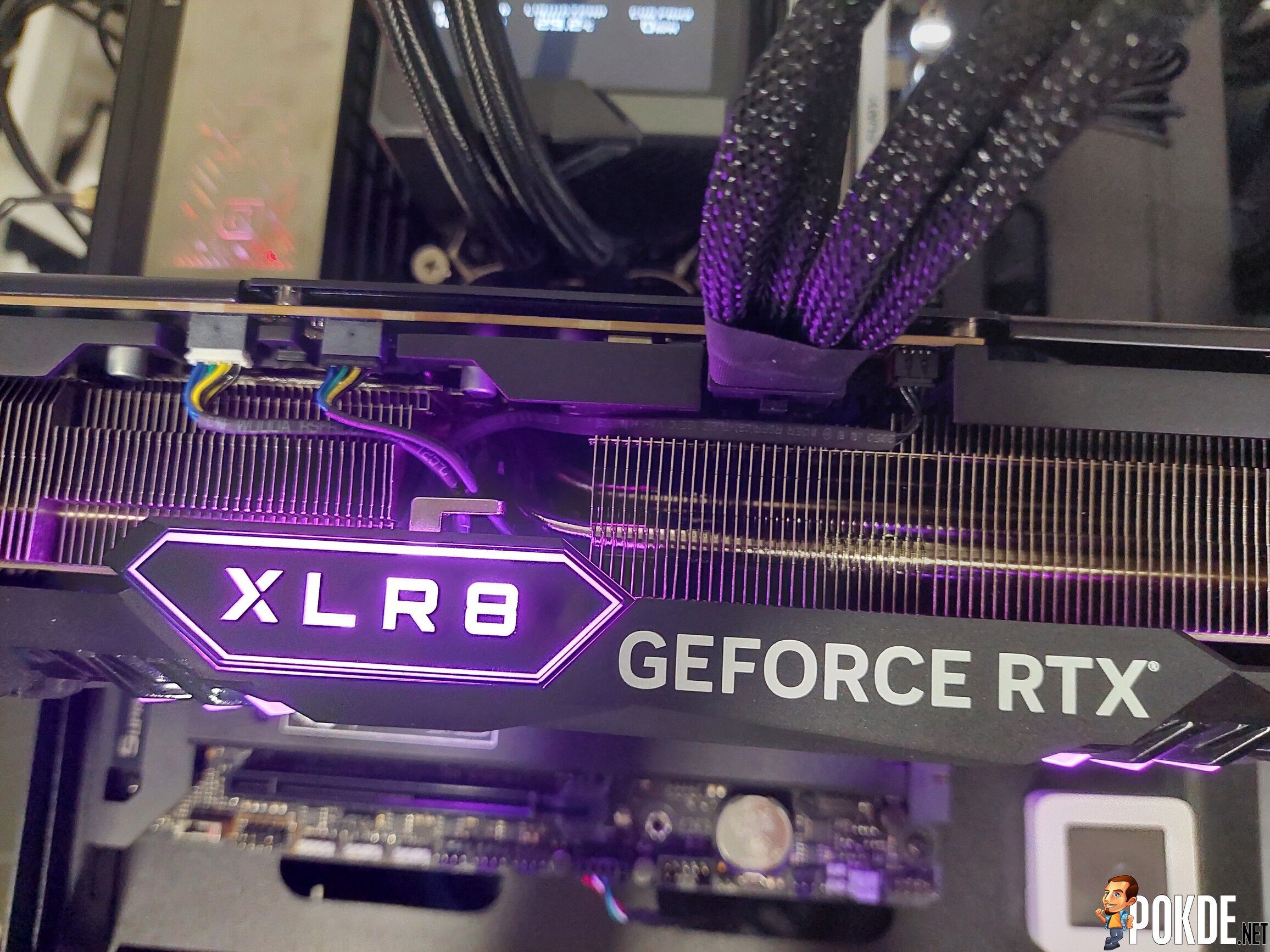
On the top side, it’s dominated by heatsink fins – though you can see what is presumably a pair of fan connectors (the colored cables look distracting though), plus a 16-pin 12VHPWR connector that takes a much smaller footprint over what could have been four PCIe 8-pin connectors. However, this card is still rated at 450W – just like the vanilla model. Some users might try overclocking it so there’s still about 225W more headroom in theory (150W + 75W from slot) to work with. Other than that, you get a new GeForce RTX branding on the shroud, plus the illuminated XLR8 branding.


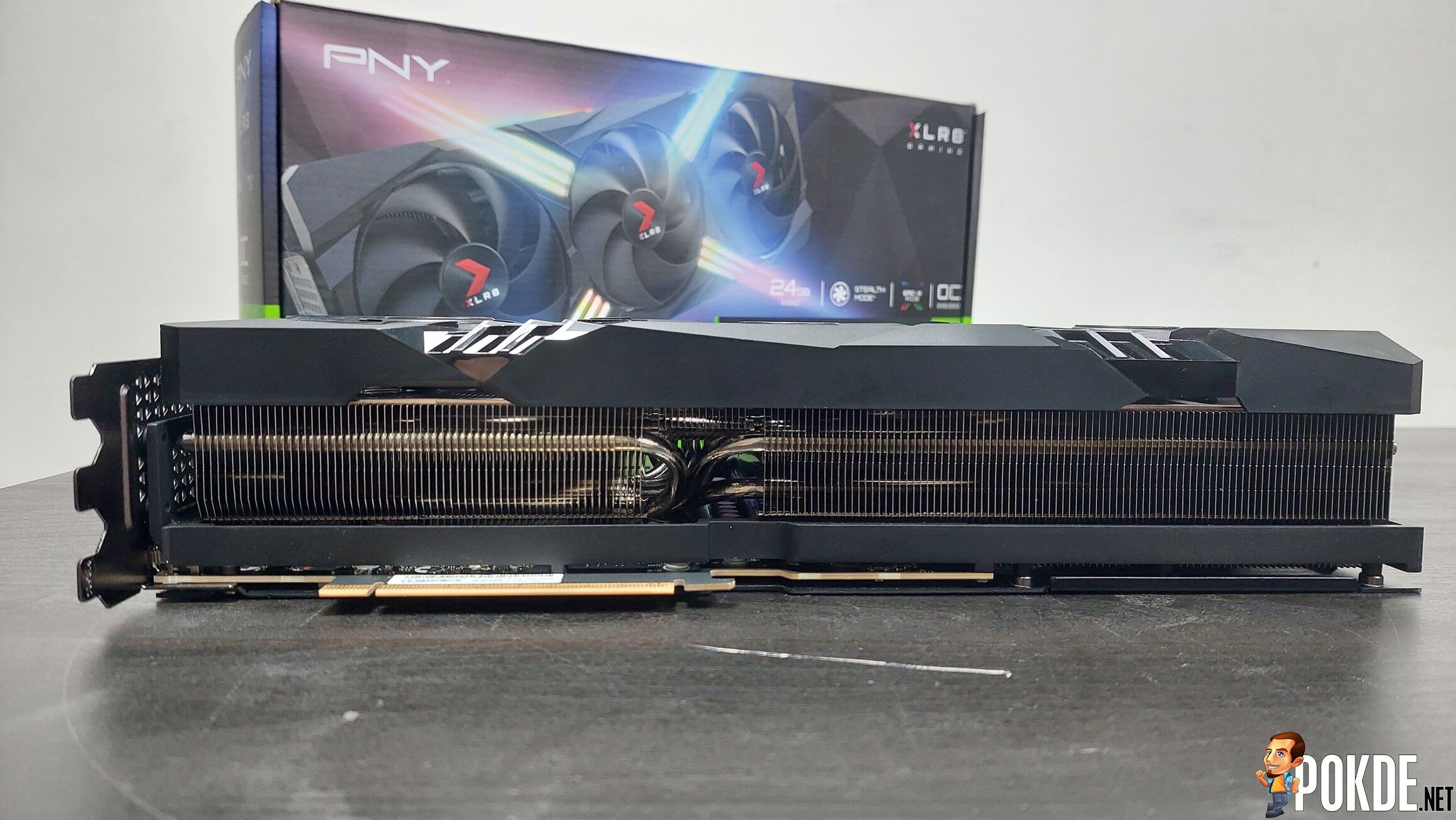
Viewed from bottom, it’s all fin stacks and heatpipes – with nothing getting in the way of these metals. The PCB is painted black, pretty much the standard color for modern PCBs these days.
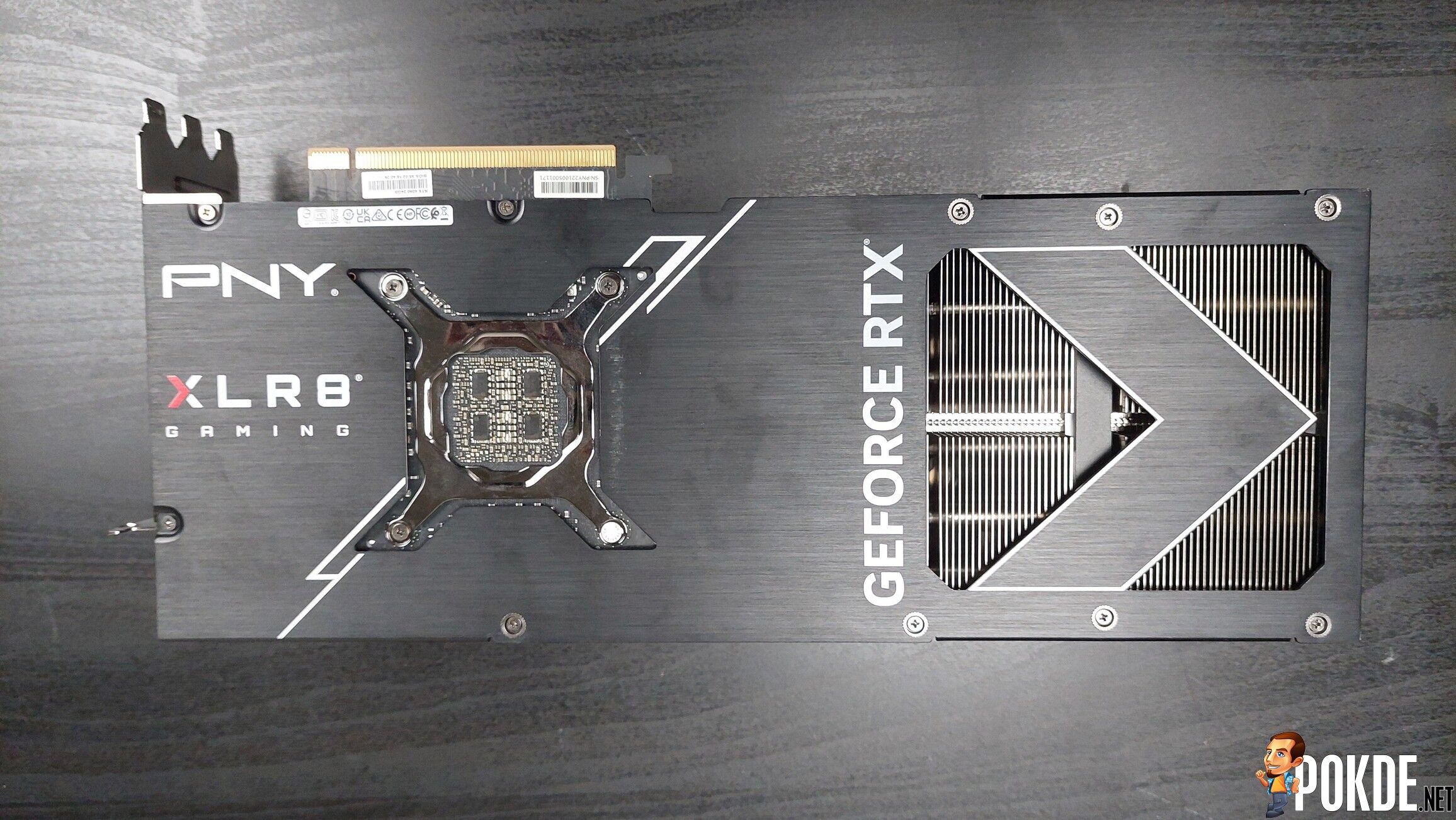
Backplate is mostly standard affair – with two-thirds of the metal-brushed plate fully enclosed (minus the exposed capacitors behind the silicon), bolted to the PCB while the outward one-third is cut with a flow-through opening to facilitate better cooling. PNY has cut the opening in the shape of arrow that resembles their XLR8 logo.
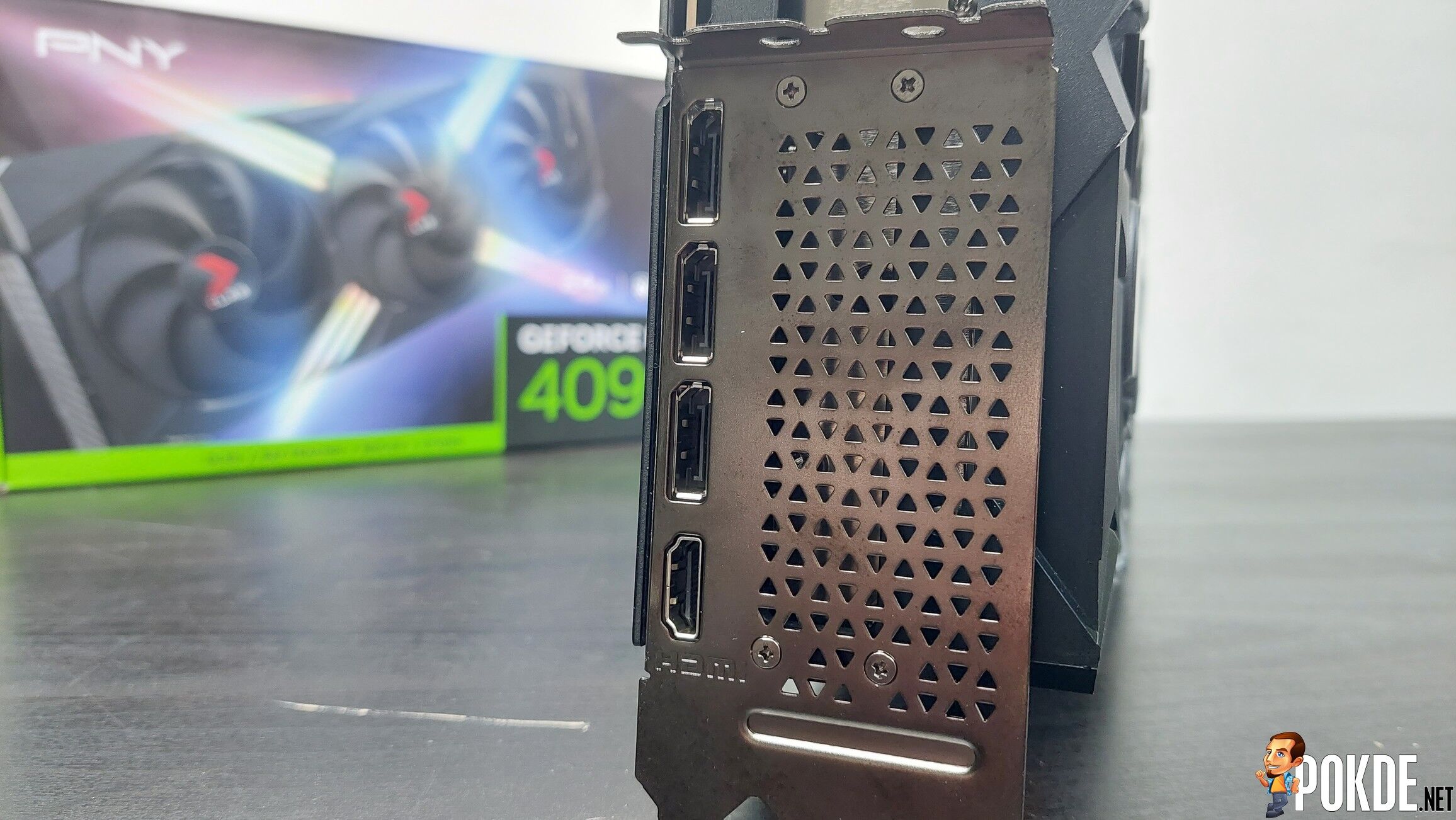
Onto the I/O. Despite the metal bracket is covered with a big perforated area, that pretty much serves no purpose – this card is cooled through the standard “open-air” design that pushes hot air through the long side of the card, unlike the blower design of old or even the push-pull design that NVIDIA uses for their own Founder’s Edition models. The ports selection are identical to vanilla RTX 4090 – with a trio of DisplayPort 1.4 ports and a single HDMI 2.1 port. Measuring at 3.5 slots in thickness, this is pretty much as thick as GPU gets.
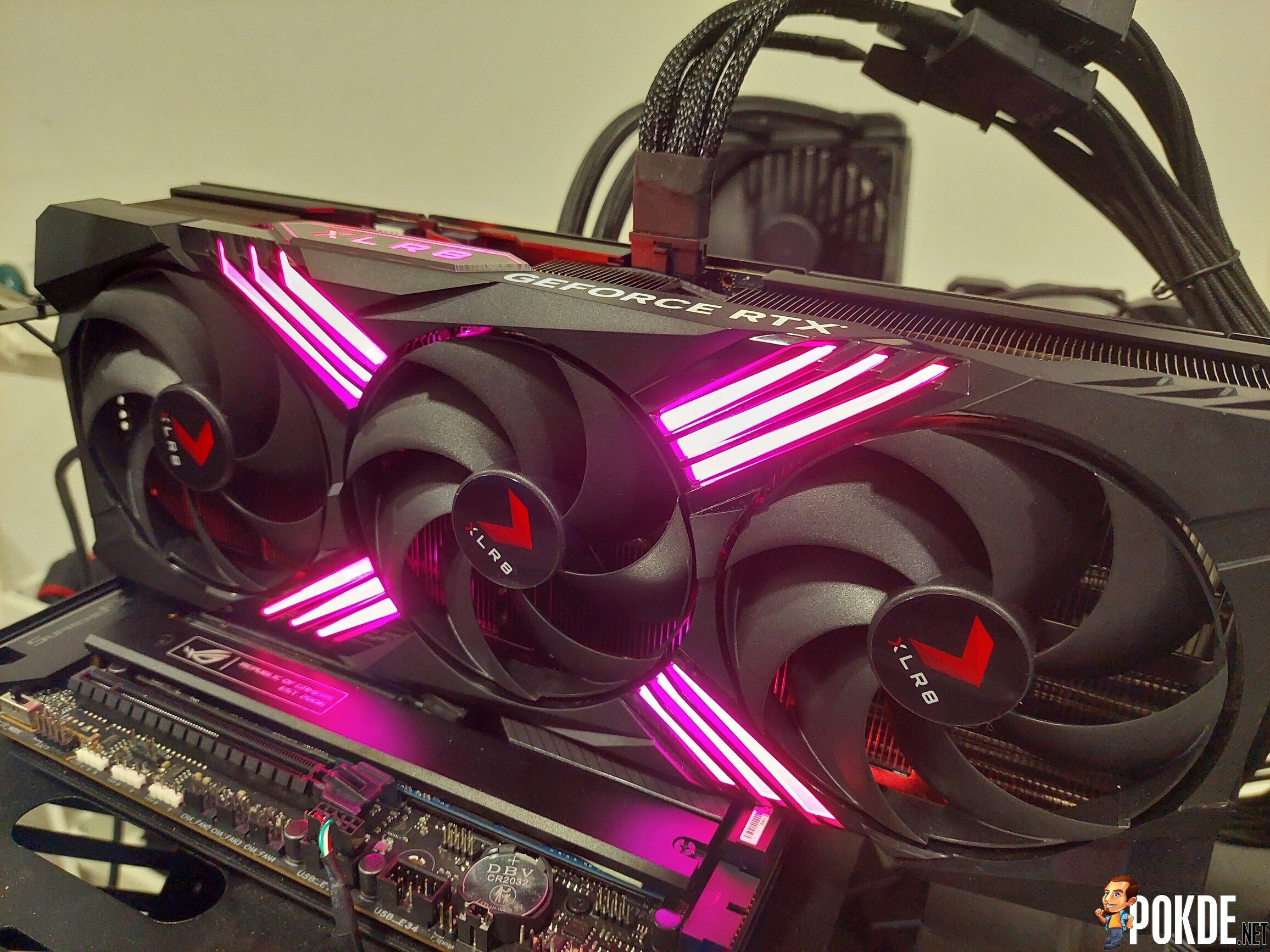
Setting up on our test rig, the RGB is given very generously here – certainly has enough of it to be your PC’s RGB centerpiece. Although that depends on your GPU placement – you’ll need a vertical PCIe riser if you want your GPU’s lighting to be on full display. For others that prefer a less in-your-face look, traditional side-mounted placement will only leave the XLR8 branding visible as RGB. Or you could just simply turn it off if RGB isn’t your thing. But you don’t do that on a card that has this much RGB on offer…
And then there’s the elephant in the room – that huge 4x 8-pin PCIe adapter. We don’t have a PCIe 5.0 capable PSU yet, so that meant we have to wire our GPUs this way. Looks fine on our part, but I definitely will think twice if this were to be my own personal PC. No one likes a thick cable getting in the way of aesthetics.
Specifications
PNY GeForce RTX 4090 OC XLR8 Gaming VERTO EPIC-X RGB
| GPU Core & VRAM: NVIDIA GeForce RTX 4090 |
|
| GPU Core Variant | AD102-300-A1 |
| Microarchitecture | Ada Lovelace |
| Process Node | TSMC N4 |
| Transistors | 76.3 billion |
| Die size | 608mm² |
| Streaming Multiprocessors (SMs) | 128 |
| CUDA Cores | 16384 |
| Tensor Cores | 512 |
| RT Cores | 128 |
| Cache | 72MB (L2) |
| VRAM Configuration | 24GB GDDR6X 384-bit |
| Memory Bandwidth | 21Gbps, 1,008GB/s peak |
| Add-in board: PNY GeForce RTX 4090 OC XLR8 Gaming VERTO EPIC-X RGB |
|
| Base/Boost Clock | 2235 / 2565 MHz *Boost clock +45MHz over stock |
| TDP | 450W |
| Recommended PSU | 850W |
| Dual BIOS Mode | No |
| Display Outputs | 3x DisplayPort 1.4 1x HDMI 2.1 *Max output resolution: 7680×4320 (8K) @120Hz |
| Power Connector | 16-pin 12VHPWR connector (600W max) *Optional 4x 8-pin PCIe adapter included |
| Bus Interface | PCIe 4.0 x16 |
| Dimensions | 3.5-slot, 331.8 x 136.8 x 71.1mm |
Test System
| CPU | Intel Core i9-13900K | |
| Cooler | ASUS ROG Ryujin II 360 AIO Cooler Master MasterGel Maker |
|
| Motherboard | ASUS ROG Maximus Z790 HERO | |
| GPU | PNY GeForce RTX 4090 OC XLR8 Gaming VERTO EPIC-X RGB |
NVIDIA GeForce RTX 3080 Ti Founders Edition |
| Memory | Kingston FURY RENEGADE RGB DDR5-6400 CL32 (2x16GB) | |
| Storage | Samsung SSD 980 PRO 256GB (Boot) Kingston NV1 1TB |
|
| Power Supply | ASUS ROG Thor 1000W Platinum II | |
| Case | VECTOR Bench Case (Open-air chassis) | |
| OS | Windows 11 Pro 21H2 | |
Performance
In the following performance comparison, the NVIDIA GeForce RTX 3080 Ti will be used as comparison and reference. All benchmarks are done in out-of-the-box settings, unless otherwise specified.
Games are tested under these settings (upscaling features such as NVIDIA DLSS or AMD FSR are turned off):
- Forza Horizon 5 (RT ON)
Maximum settings (all settings maxed out to EXTREME preset when available, Ray Tracing set to EXTREME). - Forza Horizon 5 (RT OFF)
Ultra High preset – Ray Tracing turned off. - Red Dead Redemption 2
All settings set to ULTRA – slightly higher quality over ‘Favor Quality’ from the in-game settings slider. - Shadow of the Tomb Raider (RT ON)
HIGHEST preset. RT Shadows set to ULTRA (which overrides default Shadow settings). - Shadow of the Tomb Raider (RT OFF)
Same as the previous run – with the exception of RT Shadows turned OFF, with Shadow settings set to ULTRA instead. - F1 2022 (RT ON)
ULTRA HIGH preset. Ray Tracing is set to HIGH under this preset. (RT is always ON in all quality levels.)
Synthethic Benchmarks
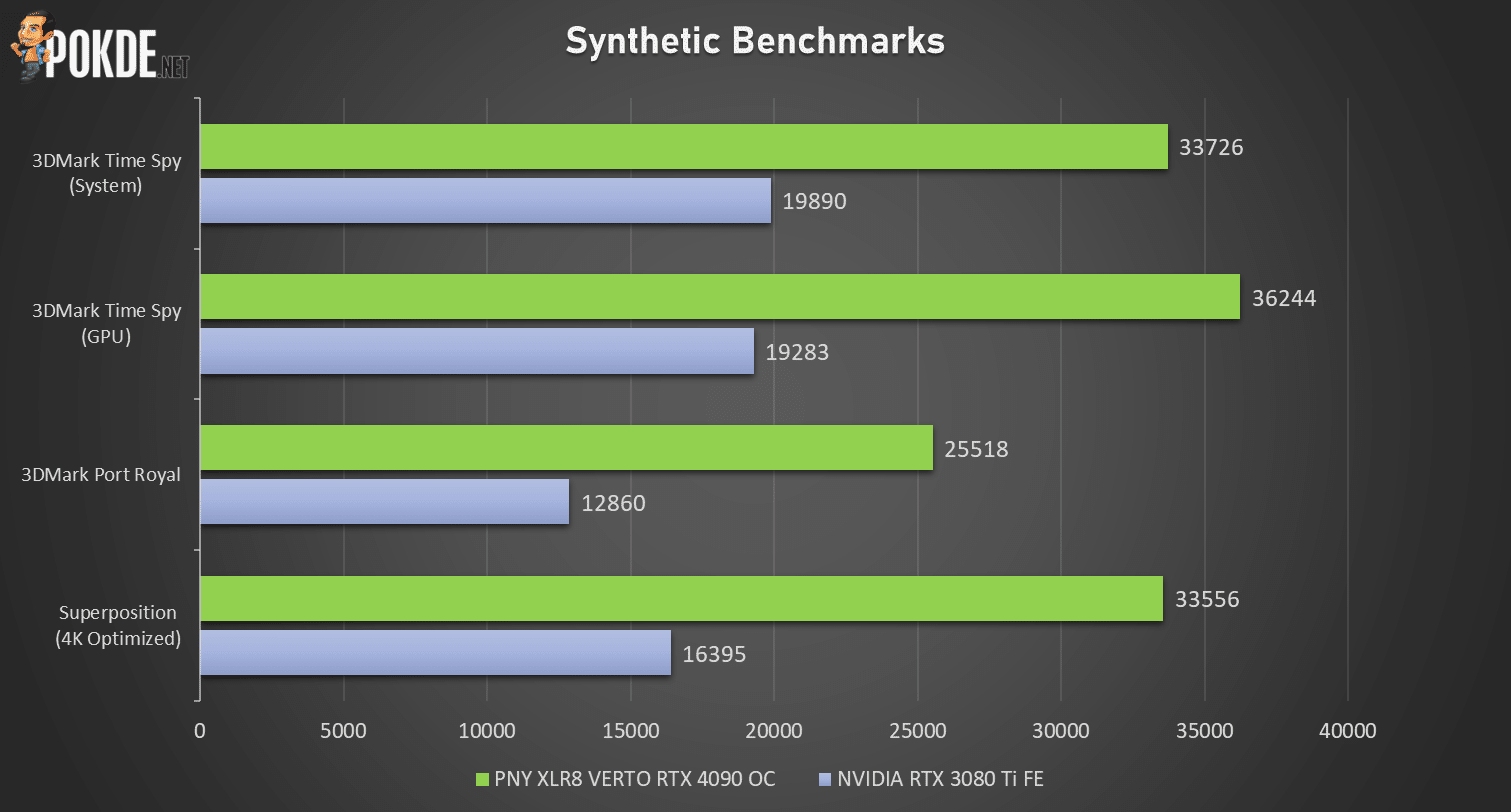
Right out of the gate, the PNY RTX 4090 made the RTX 3080 Ti look… weak. Remember back when we thought RTX 3090 (which the 3080 Ti roughly equals to) was ridiculously powerful? The RTX 4090 simply dwarfs that. So let’s go through the numbers individually.
Taking our previous generation RTX 3080 Ti as reference – you’d think for a second that looked like a midrange card’s performance, not from a previous generation near-flagship (ignoring the uber-expensive RTX 3090 and the power-limit-be-damned RTX 3090 Ti that is). Accounting for whole system’s performance – the PNY RTX 4090 nets 67% improvement over the RTX 3080 Ti. The GPU scores does 3080 Ti no favors – here the 4090 claims a staggering 88% jump over the former, leaving the older card eating the dust.
Next is Port Royal test, which determines a GPU’s raytracing performance. The 4090 effectively achieved double the performance over 3080 Ti with a 98% increase in scores. Finally, Superposition 4K has given 4090 a beatdown against the 3080 Ti with a huge +105% uplift.
Gaming – 4K (3840×2160)
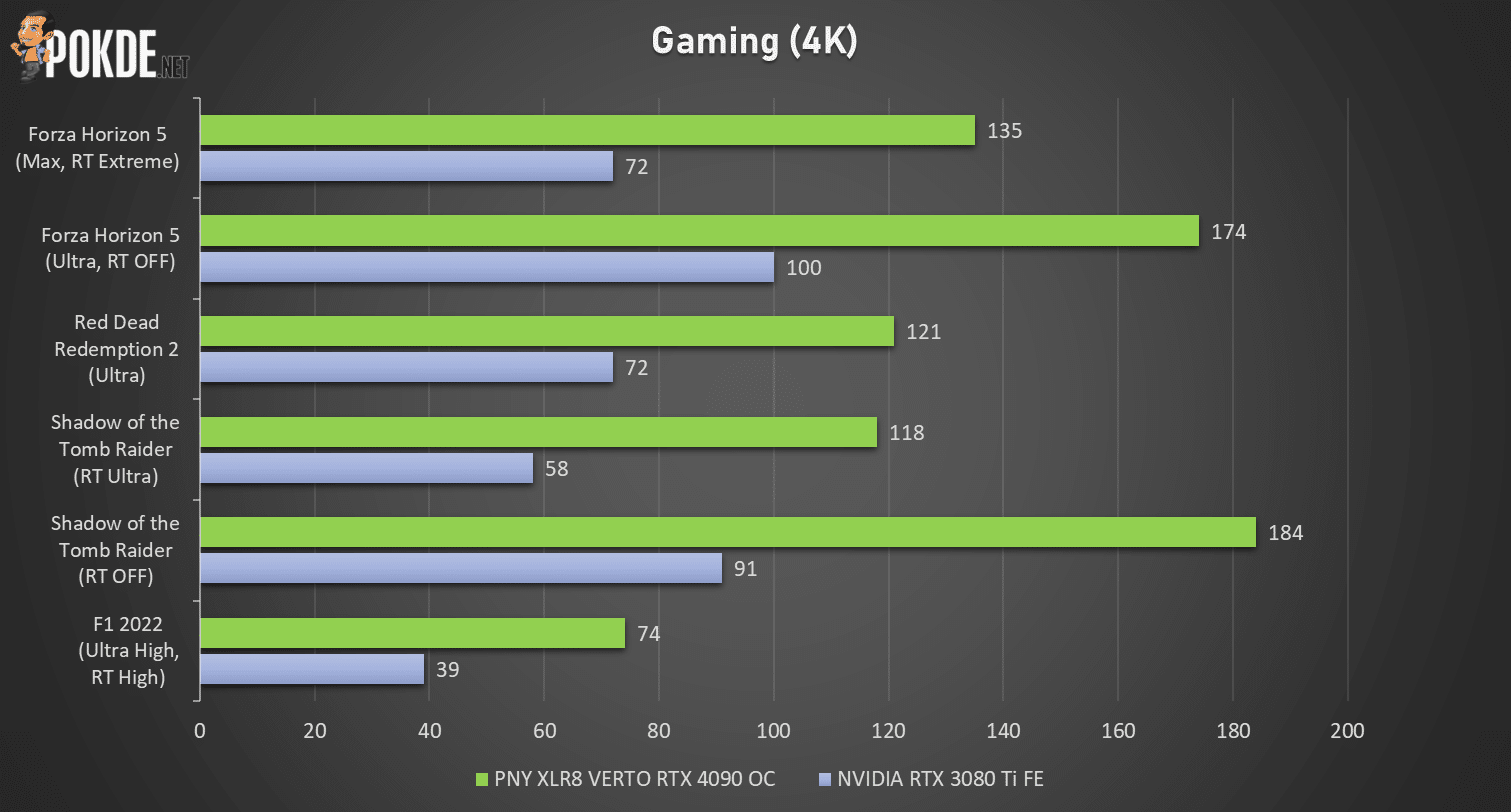
And the bloodbath continues. To put it simply – 4K is 4090’s stomping ground, and this card absolutely stomps. Despite the graphics settings on some games cranked to the max, the RTX 4090 just crunches through it, often delivering 120FPS+ on average, even with RT turned on without DLSS’s assistance. However I shall remind you while this card is screaming fast, it also guzzles over 400 watts doing these kind of framerates. The fact of this card pulling slightly less than its 450W power limit is not a consolation prize here.
Let’s sum up the numbers. Forza Horizon 5 sees similar improvements with or without RT – 87.5% with RT on and 74% with RT off. Red Dead Redemption 2 do not come with raytracing – however this game is still plenty heavy to run. In this case the 4090 is still significantly faster over 3080 Ti, at 68%.
Both runs on Shadow of the Tomb Raider has given the 4090 massive wins, achieving +103% and +102% improvement over 3080 Ti on raytraced and pure rasterization performance respectively. Finally, F1 2022 is most demanding title of this list – which the RTX 4090 achieved 74 FPS, well over the 60 FPS mark. That also means it gets a 90% jump over RTX 3080 Ti.
A reminder here – RTX 4090 gets about 60% more cores than a RTX 3080 Ti. Most performance metrics here has more than exceeded this percentage (all 6 runs average at +87.5% over 3080 Ti) so I’d say it’s very well performed at this resolution.
Gaming – 1440P (2560×1440)
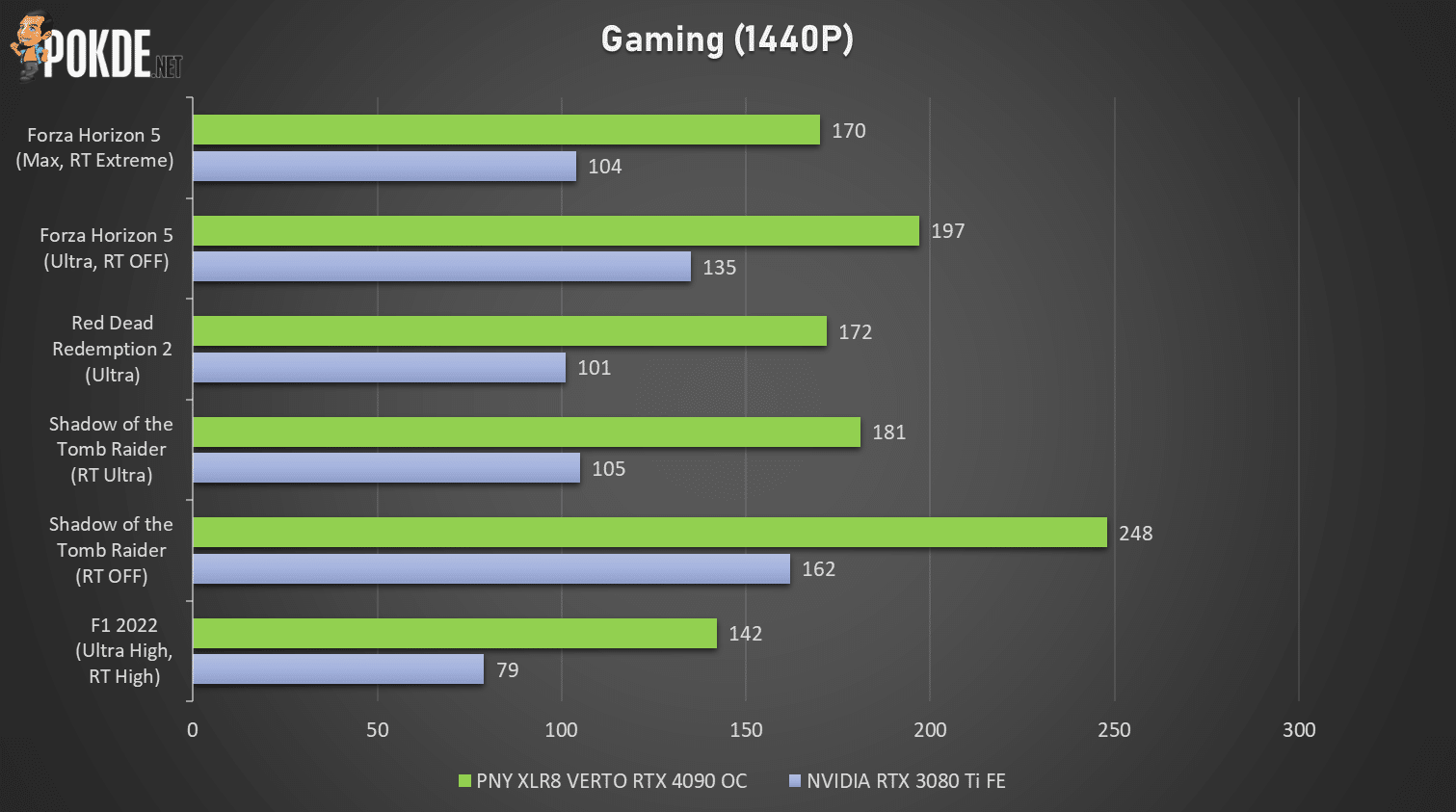
As we go down with resolution, the CPU bottleneck begins to creep in and the RTX 4090’s advantage begins to diminish. Averaging +64% improvement over RTX 3080 Ti, gaps remained huge – so let’s go through them one-by-one.
Looking through Forza Horizon 5’s runs with different RT settings has given us a clue on RTX 4090’s strengths. With RT enabled, the gap is 63% in favor of the 4090 and with it disabled that number drops to “just” 46%. We could be looking at a potential CPU bottleneck here – which is a sign that this card is best for 4K, and probably nothing less (if you don’t want to waste money that is).
RDR2 has presented a small anomaly in this test, with the RTX 4090 achieving 70% more frames over the 3080 Ti. That is, in fact, a slightly bigger gap than 4K run presented earlier in this review. We can’t exactly determine the reason for this though, but based on the test on 1080p (below this section), it looks like CPU isn’t the biggest factor for this game’s performance.
SOTTR meanwhile, has shrunk the gap between two cards with a sizeable margin. From 2x framerates on both runs in 4K – now the improvements are 72% and 53% respectively. F1 2022 has given the RTX 4090 the biggest win at this resolution, by a margin of 80% over RTX 3080 Ti.
Gaming – 1080P (1920×1080)
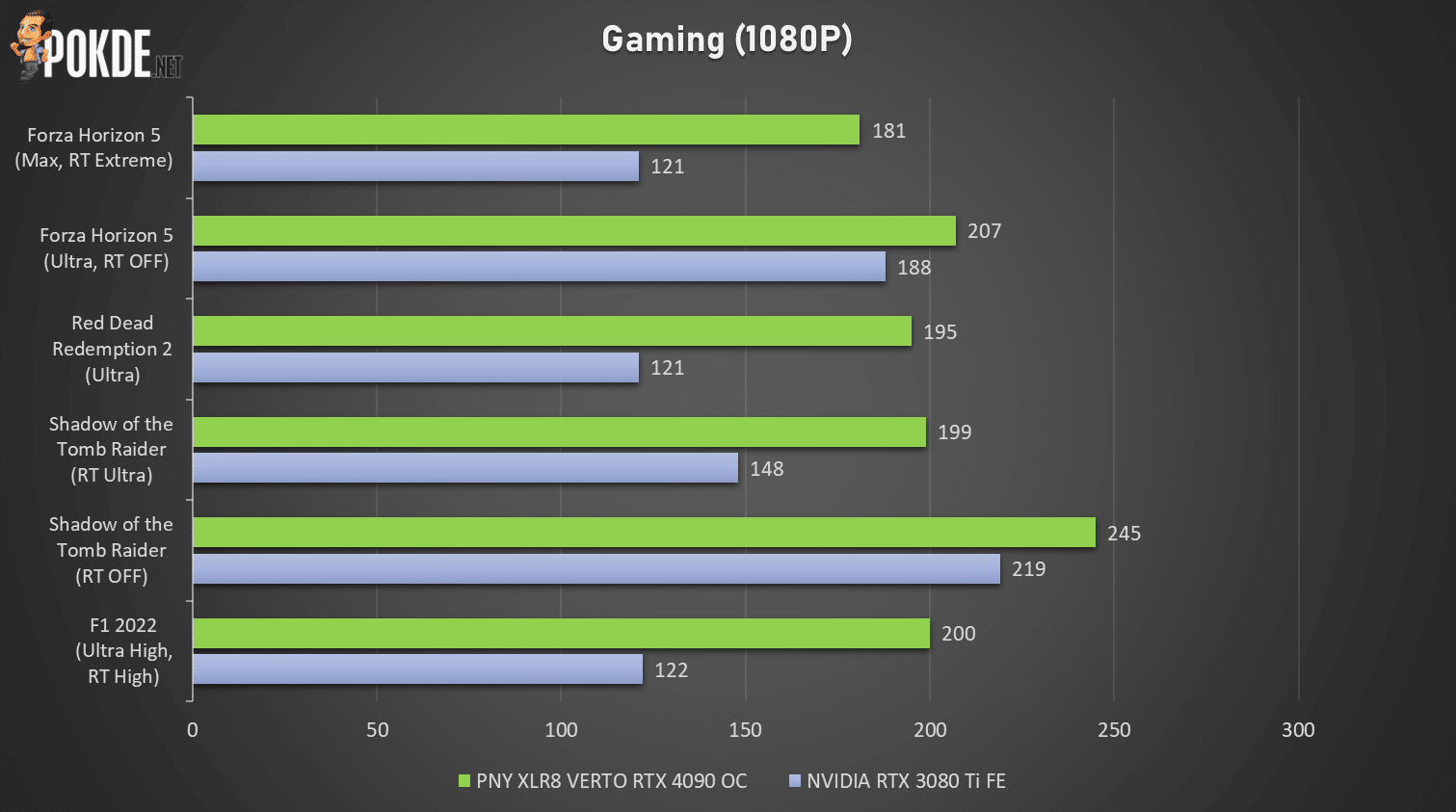
Let me get this out of the way first – it’s not a bad idea per se to use 4090 exclusively on 1080p resolution, but it sure is a terrible value proposition. For the sake of testing – let’s run through these numbers.
Depending on each games and their rendering methods – you’ll see the gap fluctuating wildly, with pure rasterization runs giving RTX 4090 only a 10% advantage in Forza Horizon 5 (RT off) in particular. So if you play exclusively on 1080p screens and is thinking of getting this card (or any other RTX 4090s for that matter) – just be warned.
…unless you swear by ray tracing, in which case you can still get up to 64% improvement (F1 2022) based on our benchmark runs. Other games with RT enabled has given RTX 4090 relatively smaller but still noticeable improvement – FH5 with RT nets 50% ahead, SOTTR with RT has the framerates increased by 34%. RDR2, being the sole non-RT title, nets the RTX 4090 61% increase in FPS over the RTX 3080 Ti.
Thermals
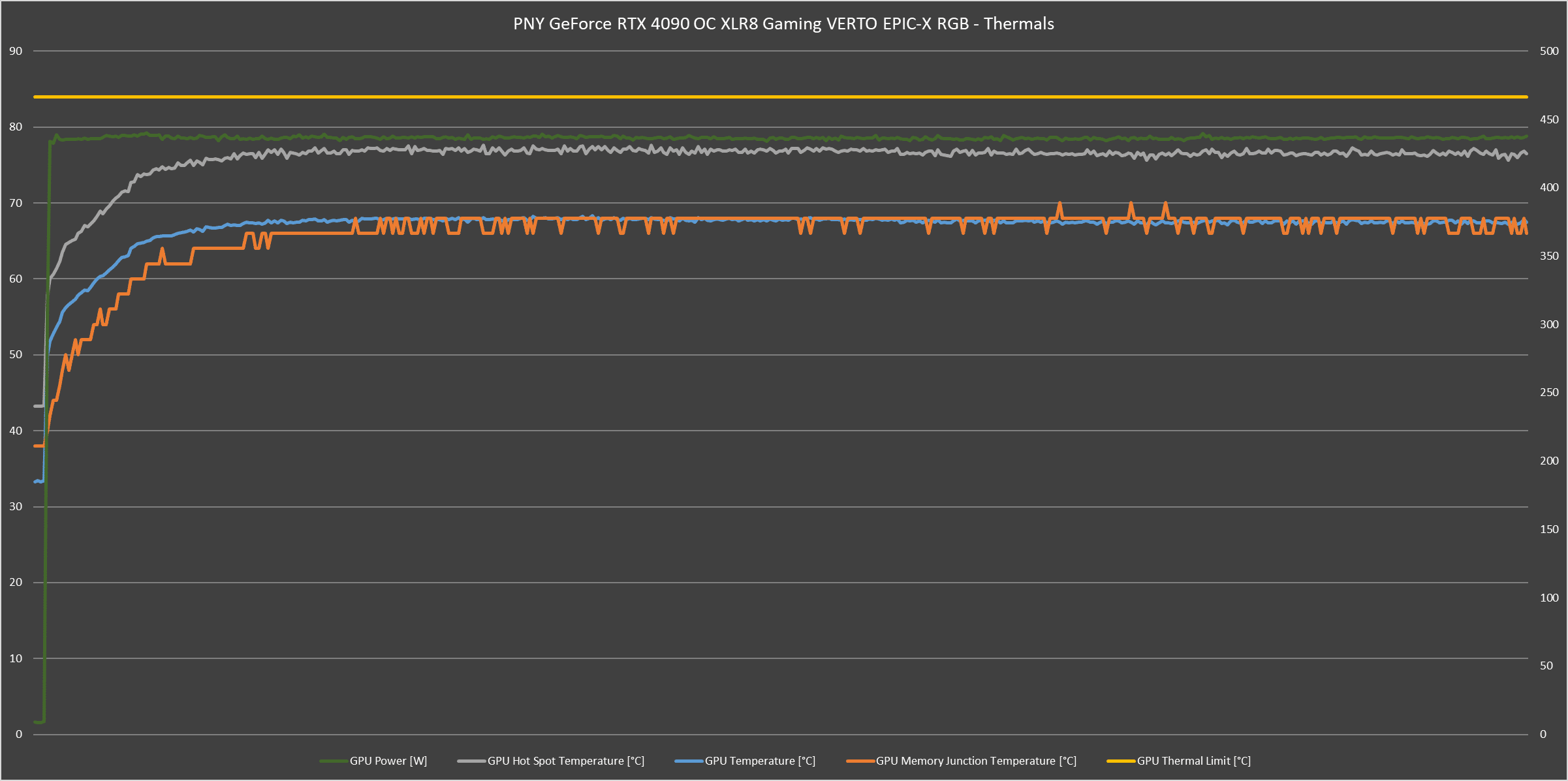
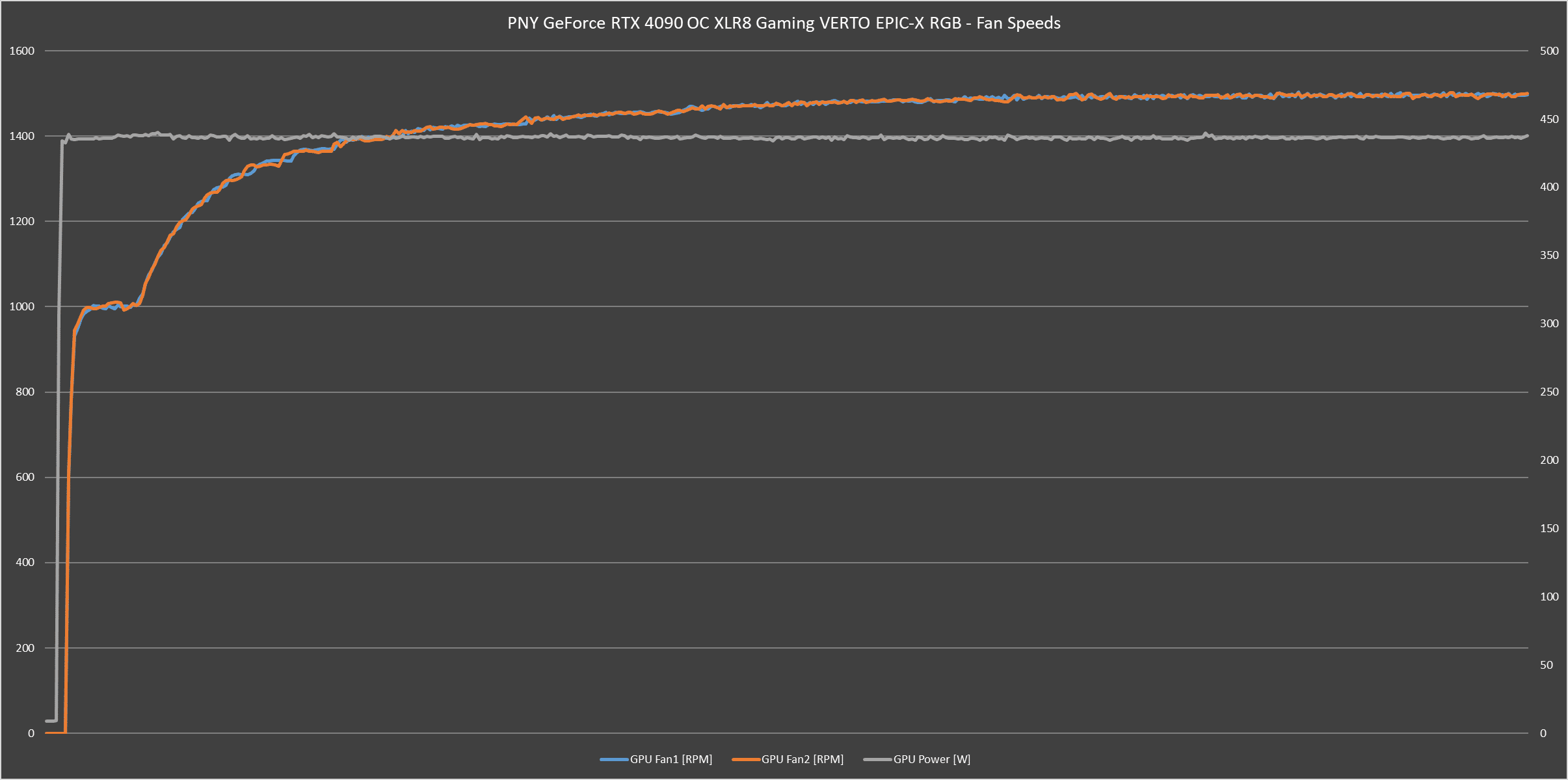
Here’s the part where PNY is actually doing the engineering and design work. Despite the massive 450W power draw – it remained virtually silent on a 10-minute Furmark stress test which sees the GPU pinned to 440 watts maximum. HWiNFO64’s data has shown the fan speed peaking and staying at 1,500RPM, and the fan noise pretty much sits within the noise floor of our office room.
Temperatures are very well managed – GPU core temp has stayed at 68°C for the most part of this stress test, giving it plenty of breathing room from the built-in 84°C thermal limit. Furmark doesn’t necessarily hit the VRAM as hard, but we still get a reasonable 70°C peak on occasions. That being said, observations on RDR2 benchmark run has seen the VRAM peaking at 74°C – hotter, but not by much. Given adequate airflow, this PNY RTX 4090 will have no issues handling the heat, despite its power draw.
Conclusion
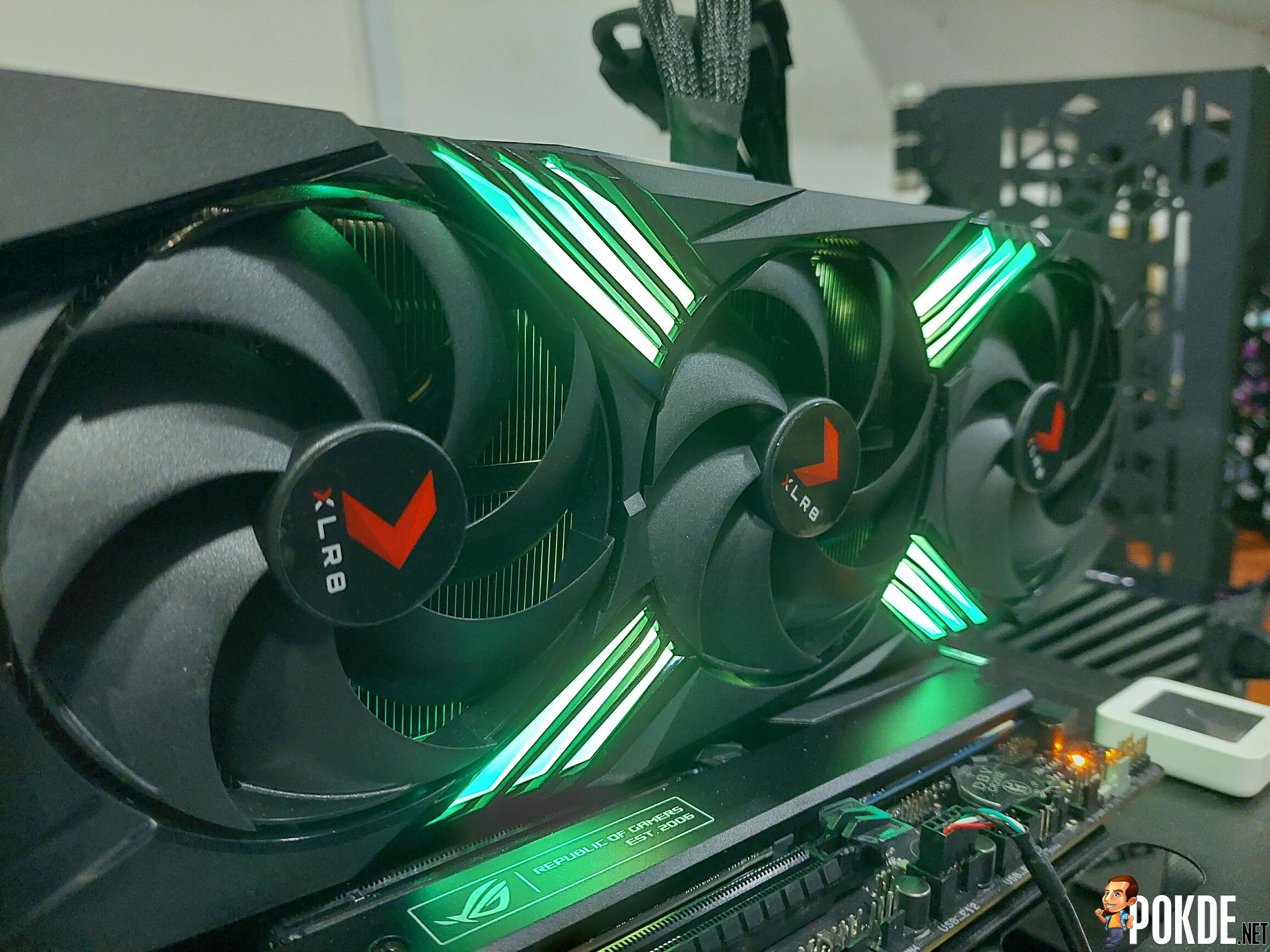
As far as supersized RTX GPUs go, this is a solid one. The PNY GeForce RTX 4090 OC XLR8 Gaming VERTO EPIC-X RGB has the basics done right: cooling, thermals, acoustics, all while keeping the dimensions relatively reasonable. Emphasis on “relatively”. Make no mistake, this is still a very huge card, and getting one of these pretty much requires careful planning that isn’t necessarily just a financial one.
What kind of careful planning, you might ask? With RTX 40 series effectively telling everyone to shoot power draw into the sky, that has caused some effects on the GPU size and peripheral requirements – and thus might cause some smaller cases unable to fit such a huge card. For the same reason – power supply is also one upgrade to consider due to the use of new 12VHPWR connector, unless you want to see a huge 4x 8-pin PCIe adapter dongle hanging off of your GPU. Ruins the aesthetics for one…
Performance wise, no question: this is the fastest gaming card available on Planet Earth right now. If you play on 4K, any other GPU will not even be on the same performance category, but I will not recommend you getting this card if you play on lower resolutions. Despite the power draw, thermals and noise are kept to a minimum – you are not sacrificing anything major (apart from the sheer size) for this amount of performance this card is capable of pushing.
Aside from performance, NVIDIA also introduces new features such as DLSS 3 – something that we aren’t able to test for now since we don’t have DLSS 3 titles. But my take on this feature is: much like motion smoothing feature on TVs, this is not something you would turn on all the time, but rather on a case-by-case basis. Those who play competitively should stay on native framerate or use Reflex instead.
For this particular card which offers the OC clock bump (not that it matters a lot, it’s just +45MHz or roughly <2%), it doesn’t have dual BIOS features that some other AIBs offer – but out-of-the-box wise, this is very much ready to rock with no configuration needed. Optionally, you can do some tuning and customization through their VelocityX software, but we have a small issue in RGB customization which it doesn’t seem to apply the setting at all. You might prefer to use MSi Afterburner – but the option is for you to choose.
And the price. PNY’s Shopee Store lists RM8,699 – which, for reference, is $1,978 at current exchange rate. This card is in fact priced $1,629 over at US – $30 more than the Founders Edition pricing. Though at this point I doubt anyone who are going for this price bracket is going to care how much it costs… (RTX 4090 is still sold out in many markets, mind you) it’s a halo product after all. If you can stomach that price, you won’t be losing out on the things that makes a graphics cards great.

Special thanks to PNY Malaysia for providing us the GeForce RTX 4090 OC XLR8 Gaming VERTO EPIC-X RGB for the purpose of this review.



![[UPDATED: Statements] Forza Horizon 6 Dev Drops Multi-Millennial Ban Hammer To Cheater Before The Game Has Even Released - 89](https://cdn.pokde.net/wp-content/uploads/2026/05/12022254/fh6leakpermabancover-420x280.jpg "[UPDATED: Statements] Forza Horizon 6 Dev Drops Multi-Millennial Ban Hammer To Cheater Before The Game Has Even Released - 90")


