


Intel Arc A750 Review – Redemption Arc?
-
Appearance - 8.7/10
8.7/10
-
Efficiency - 7.8/10
7.8/10
-
Features - 8.2/10
8.2/10
-
Materials - 8.5/10
8.5/10
-
Performance - 8.2/10
8.2/10
-
User Experience - 8.5/10
8.5/10
-
Value - 8.5/10
8.5/10
Summary
If you mostly play mainstream games and just needs a cheap yet solid card to get going, the Intel Arc A750 may fit into that need.
Overall
8.3/10Pros
+ Clean, sleek design
+ Arc Control is easy to navigate
+ Accessible GPU tuning
+ Subtle fan noise
+ Affordable
Cons
– Feature set is still work-in-progress
– No FPS counter on telemetry
Intel has been known for decades by now as the CPU chipmaker. You think of CPU – you think of Intel, that kind of deal. However that doesn’t mean the Chipzilla never got into graphics business in the past: in fact, 25 years ago they had the i740, which didn’t live for long for a design error that tanked its real-life performance. In the early 2010s they tried again with the Larabee project, and once again failed (though it lived on as Xeon Phi server processors).
To really get the discrete GPU business going, Team Blue poached one of the biggest names in the GPU industry, Raja Koduri – former chief architect of AMD Radeon Technologies Group. (His work includes Radeon “Polaris” architecture and Vega.) And thus started a journey of a new player in the GPU space, would Intel be challenging the status quo as we know it? Here we have the Arc A750, and it may tell us if Intel’s got the chops.
Unboxing
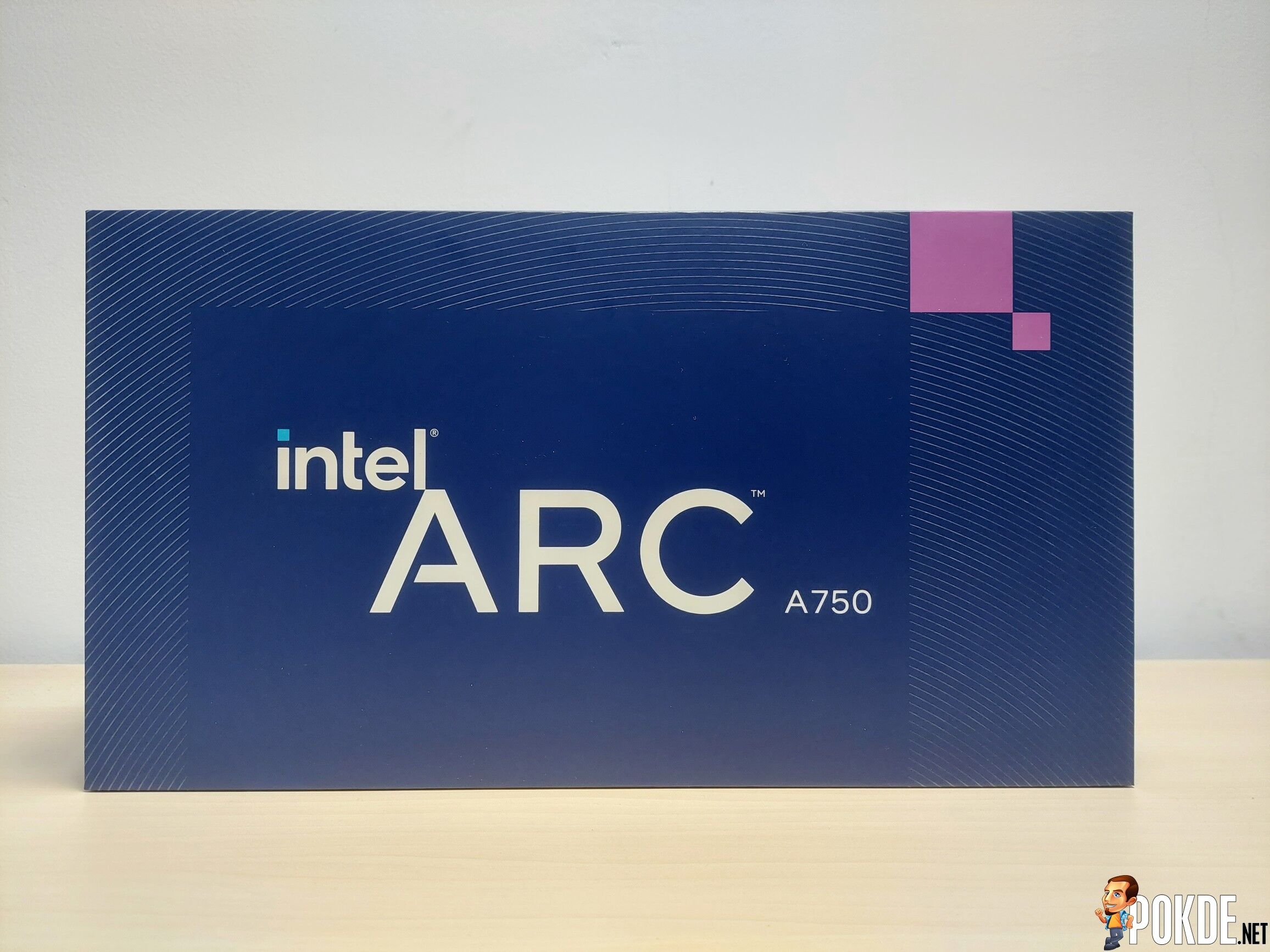
The entire box is as minimalist as it gets: only the wordmark is seen on the front and the opening side of the box, nothing else. There’s no images of the GPU seen on the box either so this is the “you have to see it for yourself” kind of packaging we’re talking about.
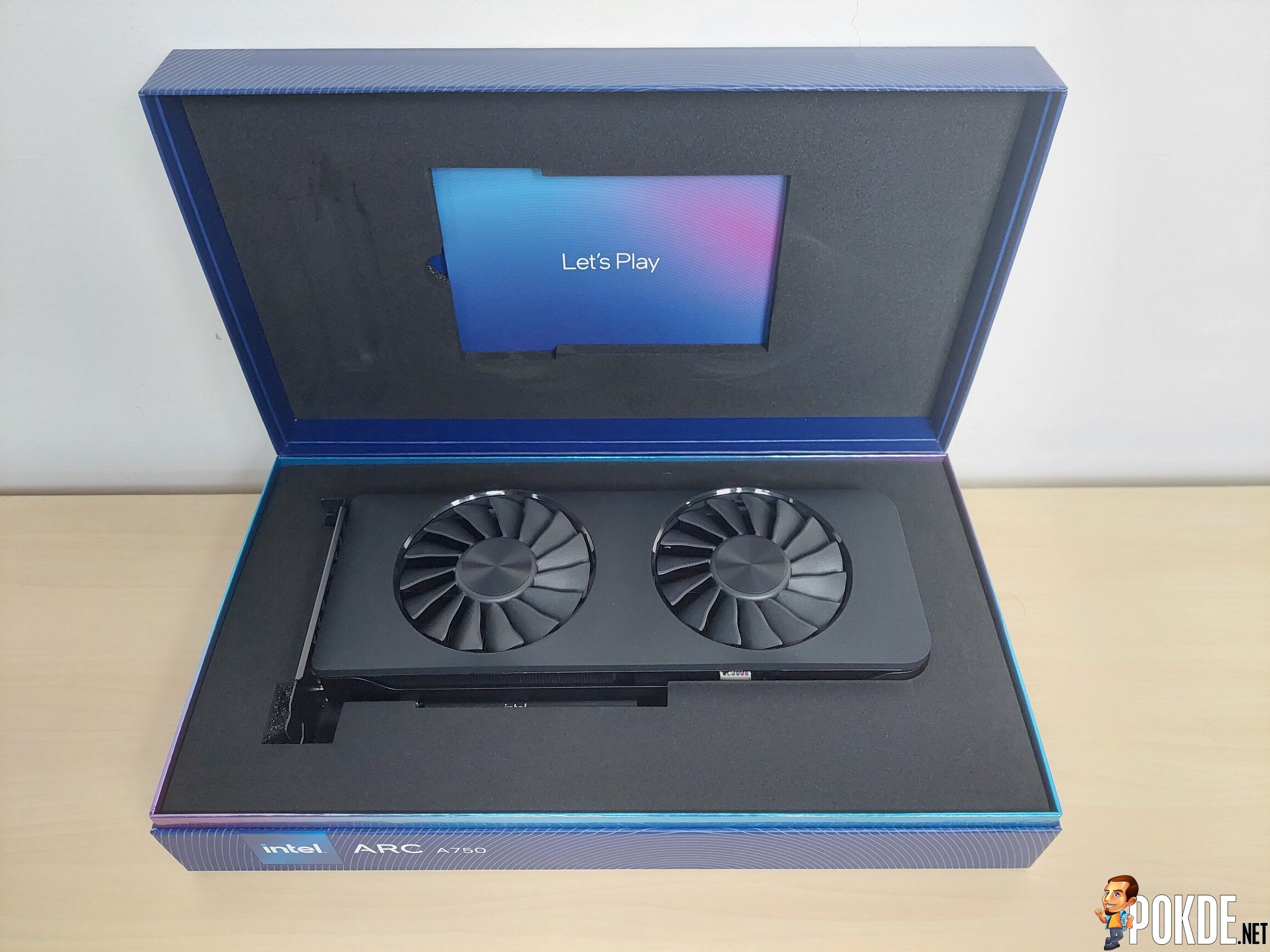
Just like NVIDIA and AMD first-party cards’ packaging, Intel went with the clamshell box and you get the GPU presented right in front as you open it. Aside from that, the “Let’s Play” card is doubled up as a thank you card with the quick start guide hidden behind it on the top side of the interior. It’s held pretty snug in the foam so you’ll need some force to pull it out.

Three things: you get the Quick Start guide, a thank you card and the Arc A750 itself. On the thank you card there’s a sticker placed inside – it’s up to you to stick it on the front panel of your case to tell everyone you’re the proud owner the GPU that marks Intel’s return to the GPU game.
Appearance
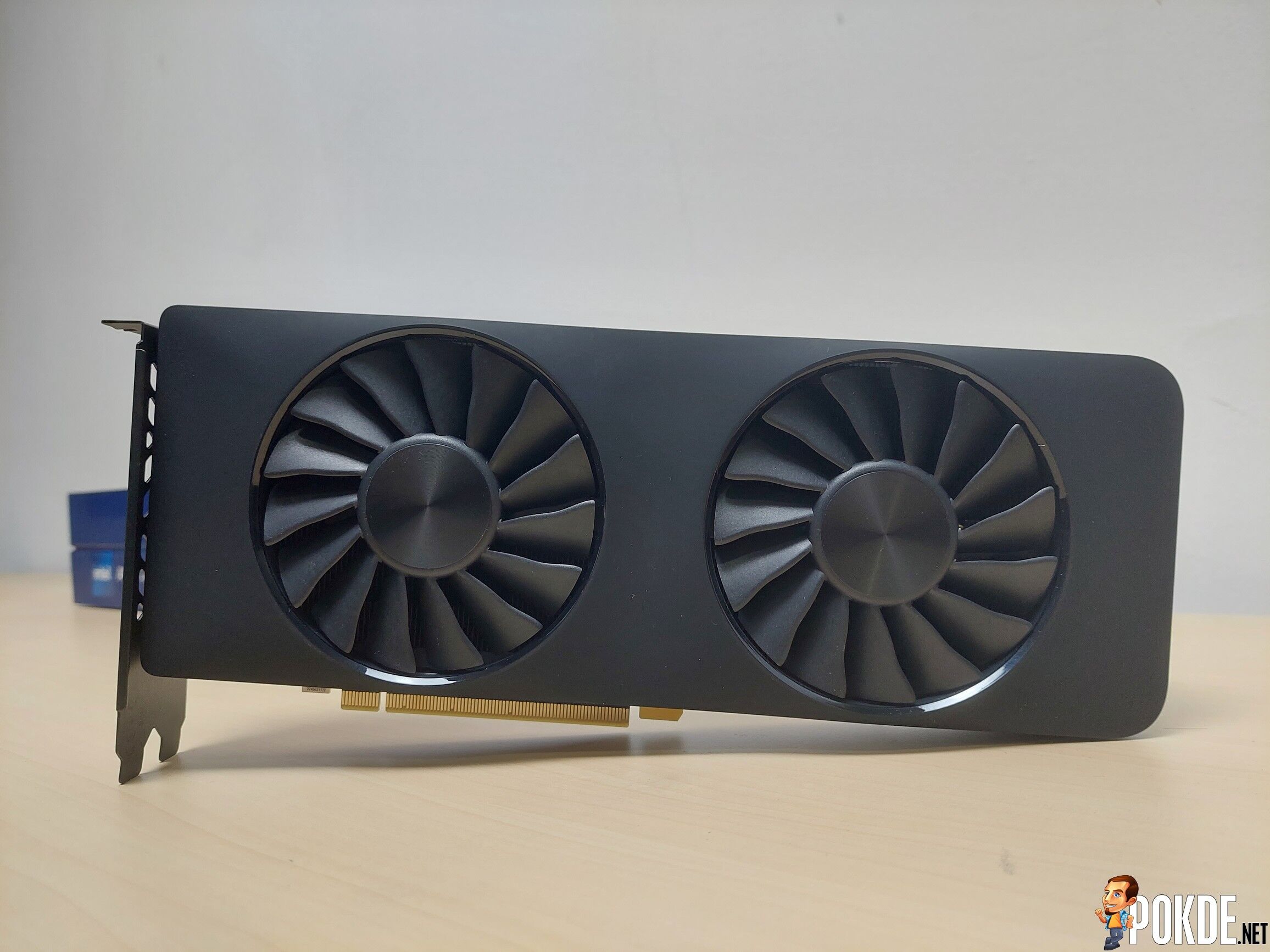
The A750 while sitting quite high up in the Arc Alchemist’s product stack, it’s still a mid-range product. Power figures are pretty standard affair, as a “225W” card (we’ll talk about the TDP later) it’s very small in size, at 280mm long and occupies just two slots. Perhaps Raja Koduri brought more than just his GPU know-how – much like the Radeon Vega of old, the Arc features an incredibly clean design overall.

The fan blades features a rather interesting shape with “ripples” following along the blade edges. The fan features 16 blades in total – and underneath it there’s visible color-coded cables that Intel didn’t paint it black to keep it hidden, but you won’t be seeing that part of the GPU anyway as long as you’re placing it inside a standard PC case.



Top side is basically void of anything other than heatsinks, sandwiched by the shroud and backplate. The PCIe connector features a 8+6 pin design which supplies 150+75W in total – so 225 watts without counting the 75W socket power (which totals in 300W combined). The GPU can be tuned to exceed 225W TDP, so having an extra 6-pin PCIe connector is warranted.
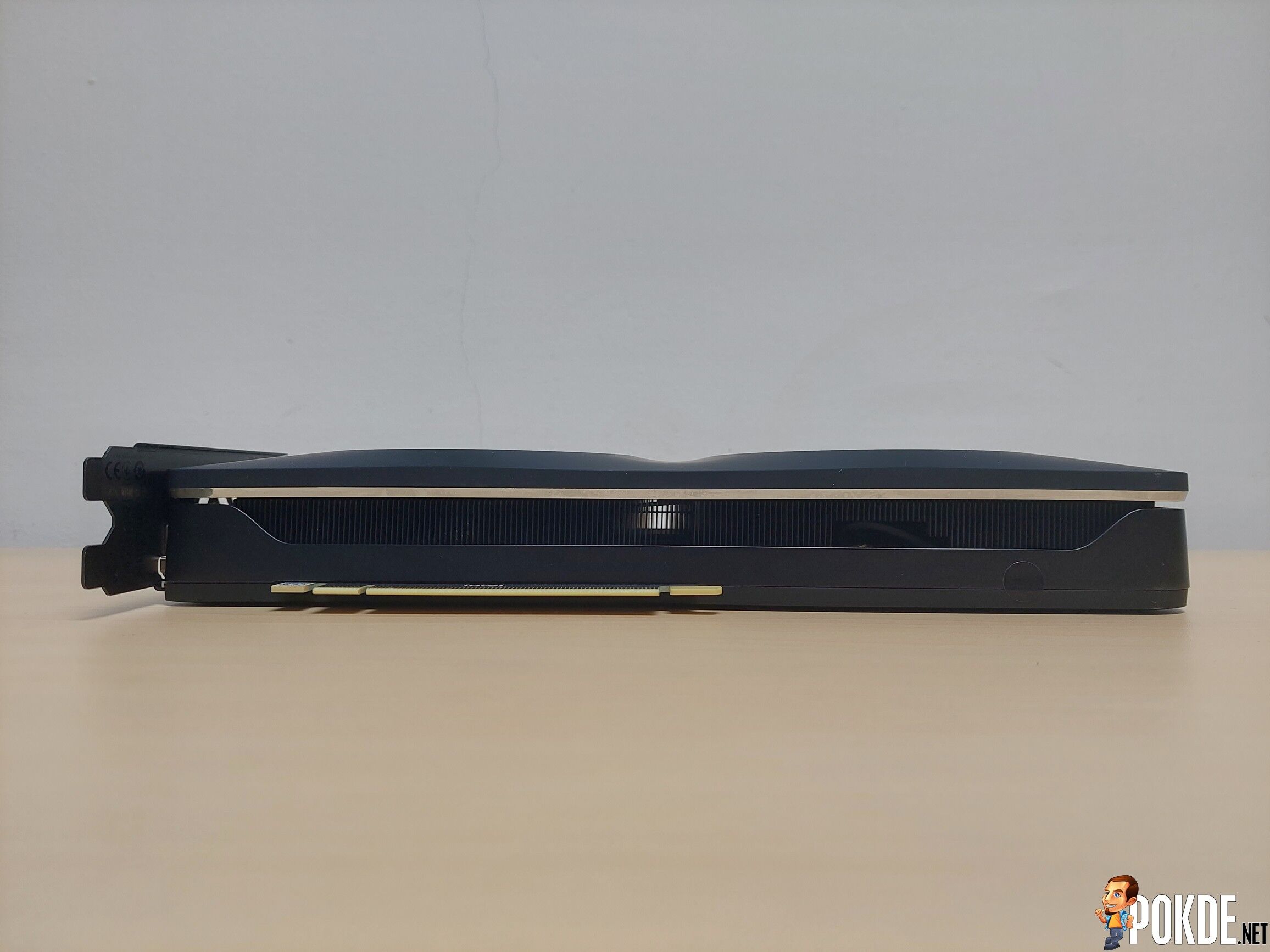
Bottom side doesn’t reveal much, it’s once again full of heatsink fins. Though from this view you can see the fans are slightly protruded from the shroud but it’s difficult to tell when viewed from the front. Total thickness are exactly 2-slots tall accounting for the fan bulges – fitting this card into small cases won’t be an issue.

The backplate is, at least in my opinion, one of the best looking designs in recent years. I know some people thinks Radeon Vega looked bland – which, fair point – but with how many GPUs these days featuring all kinds of muscular lines and edges, it’s like a breath of fresh air seeing simple yet immediately recognizable designs like this. For this Arc A750 though, there’s no RGB on the right side like the A770 does – it’s replaced by a strip of chrome plastic instead.
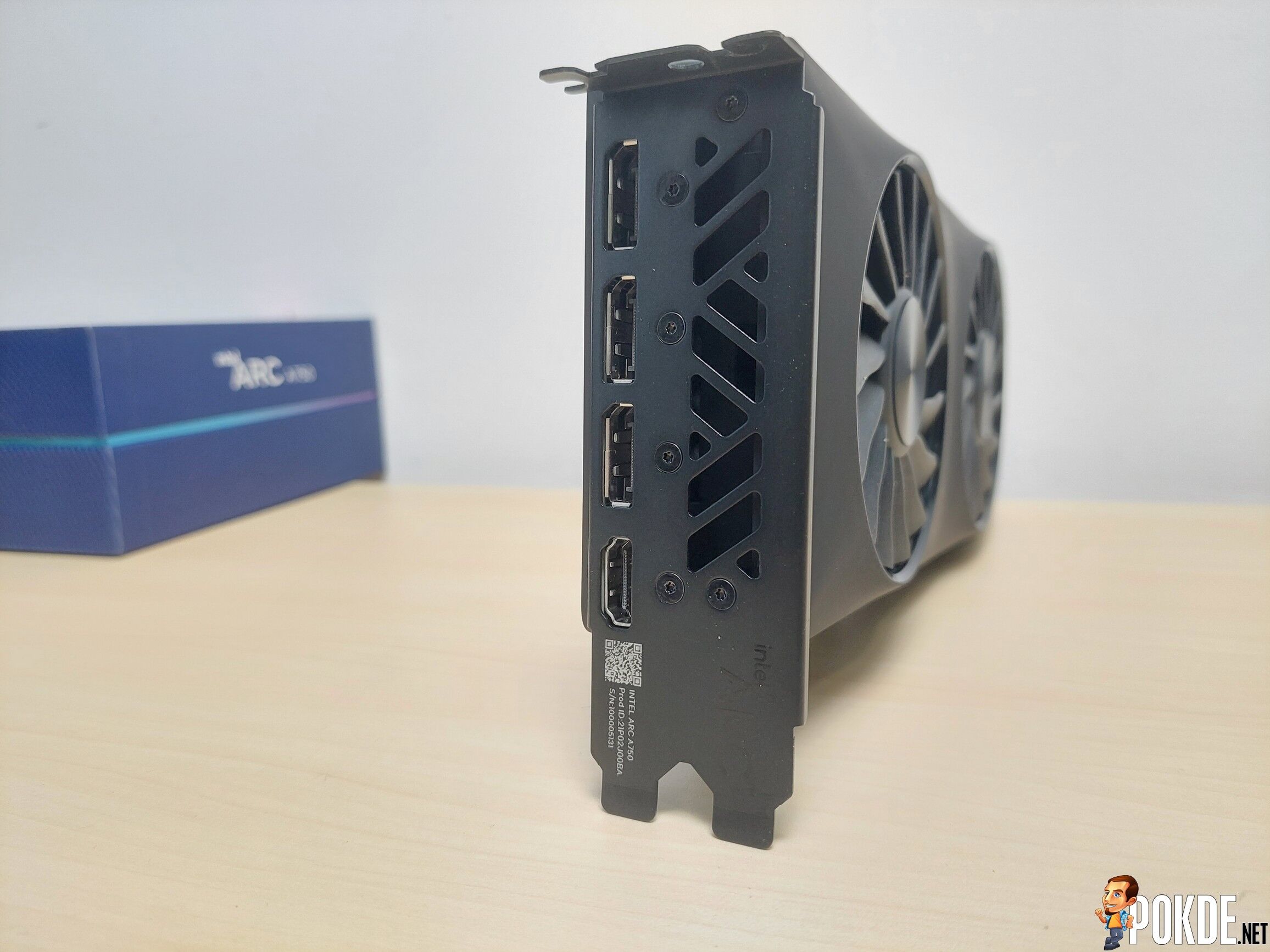
The I/O are pretty respectable: you get three DisplayPort 2.0 ports which supports up to 8K60 – which is plenty for displays of today even though AMD has DP 2.1 which in theory can drive a staggering 8K165 resolutions. HDMI 2.1 is the fourth port and it’s just about ubiquitous in latest displays and TVs by now, so you can run 4K144 displays just fine (and strictly that, you won’t game at that resolution realistically).
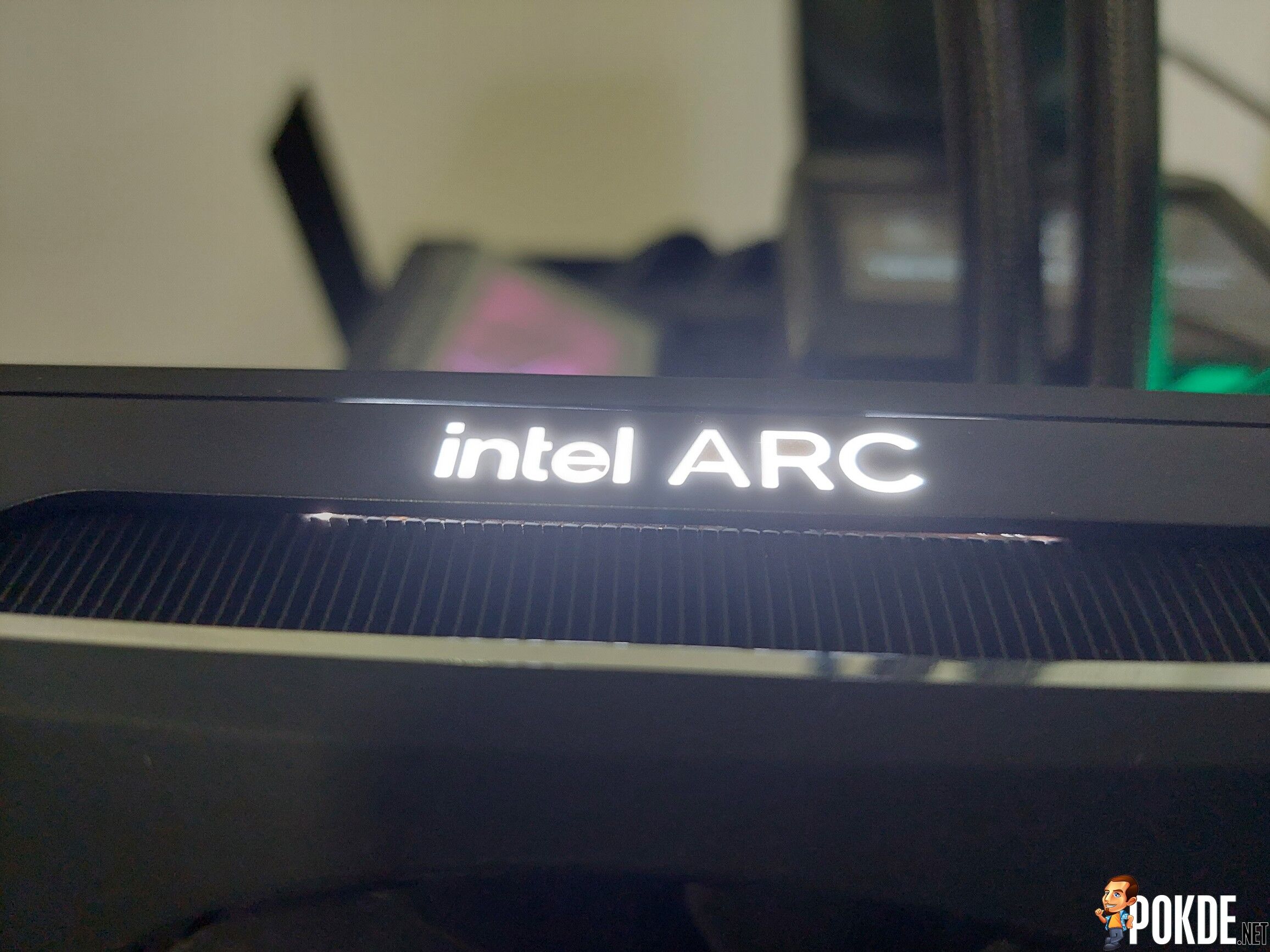
As mentioned earlier – the only place for lighting is the Intel ARC logo on the top side of the card. Unlike the A770 which features in-fan lighting and a strip across the shroud, here it’s all replaced by a chrome strip and there’s no RGB controls available on this card.
Software
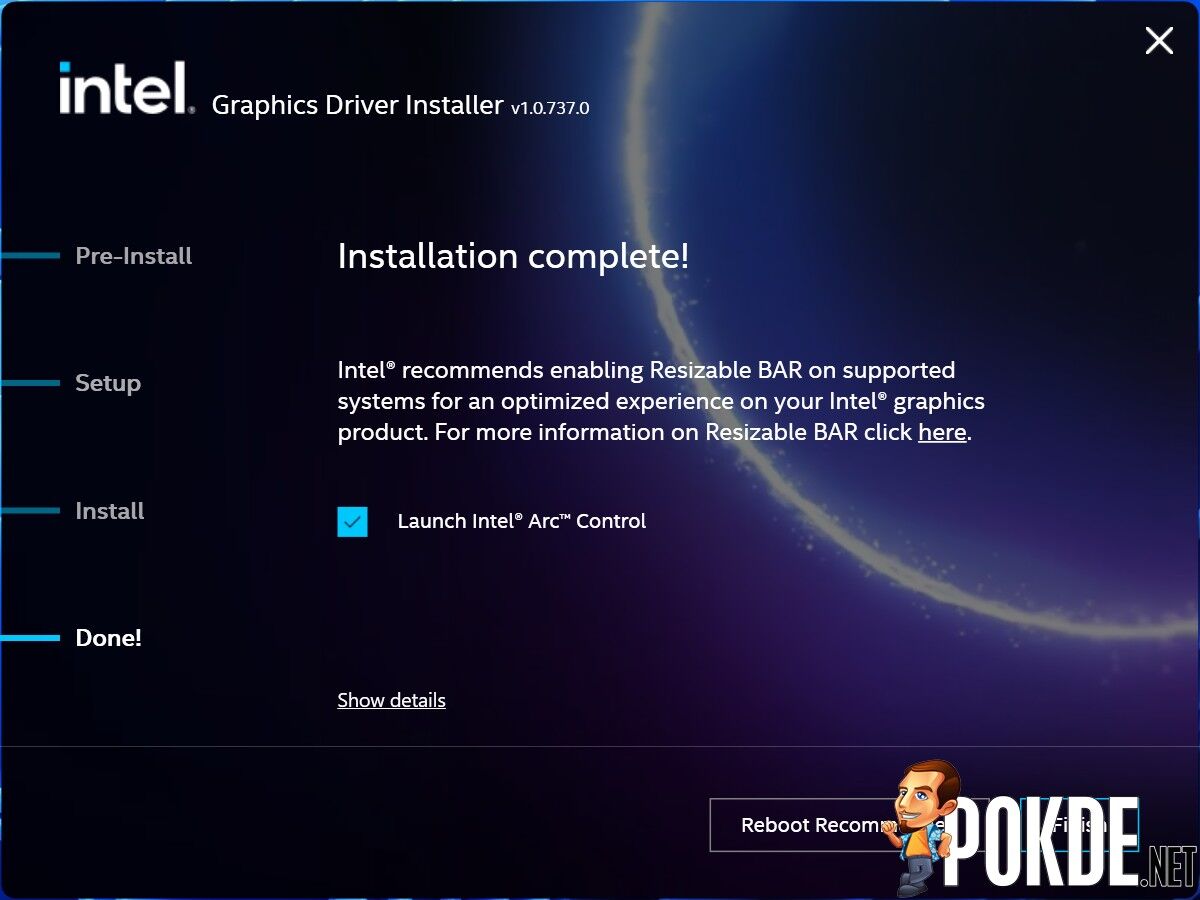
Intel wants to remind you a very important thing before using this GPU: turn on Resizable BAR. During the process of installing you can pretty much see this word mentioned in the entire installation process, so you won’t forget to enable that feature (Intel’s GPUs are heavily reliant on ReBAR support to perform optimally, turning ReBAR off may cause significant performance drops).
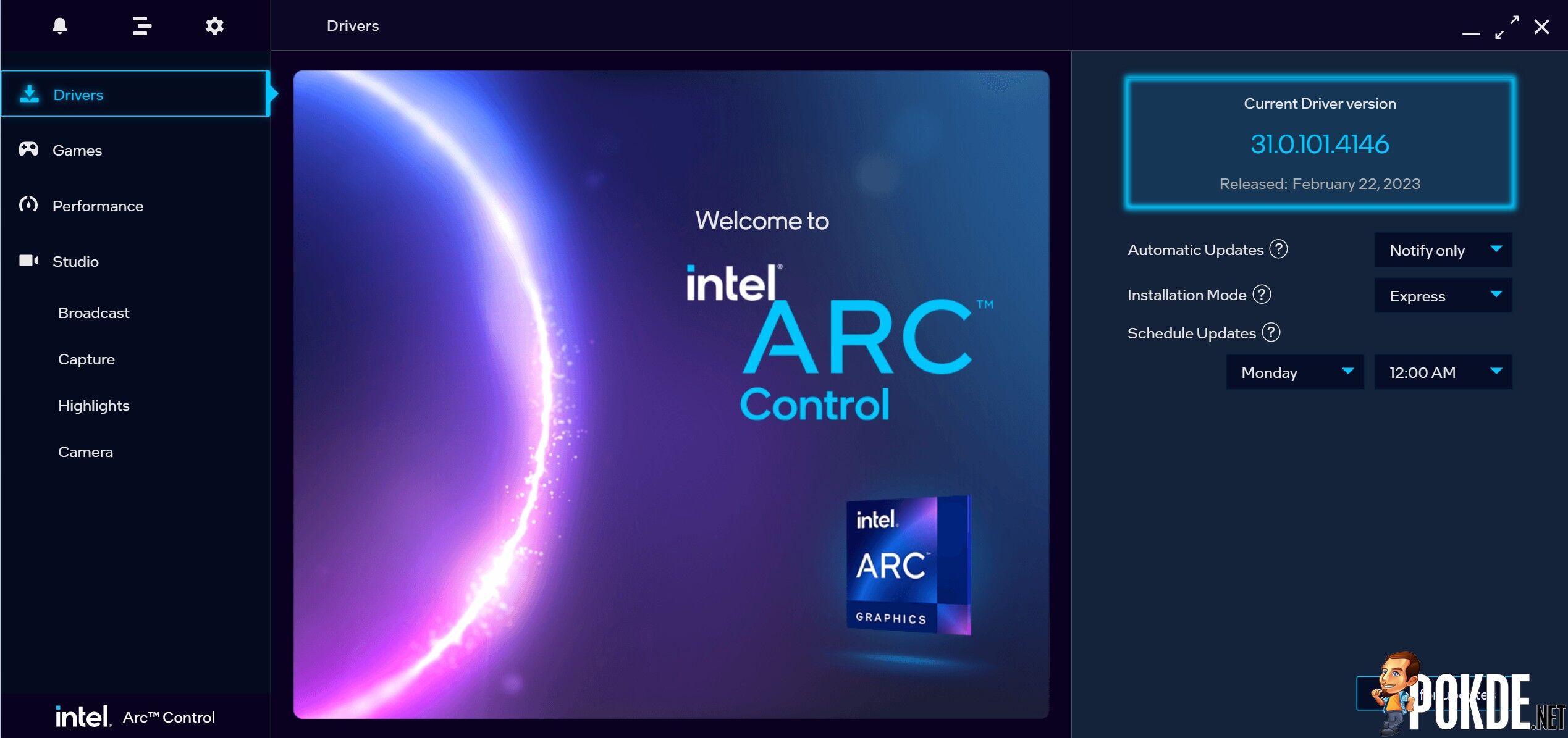
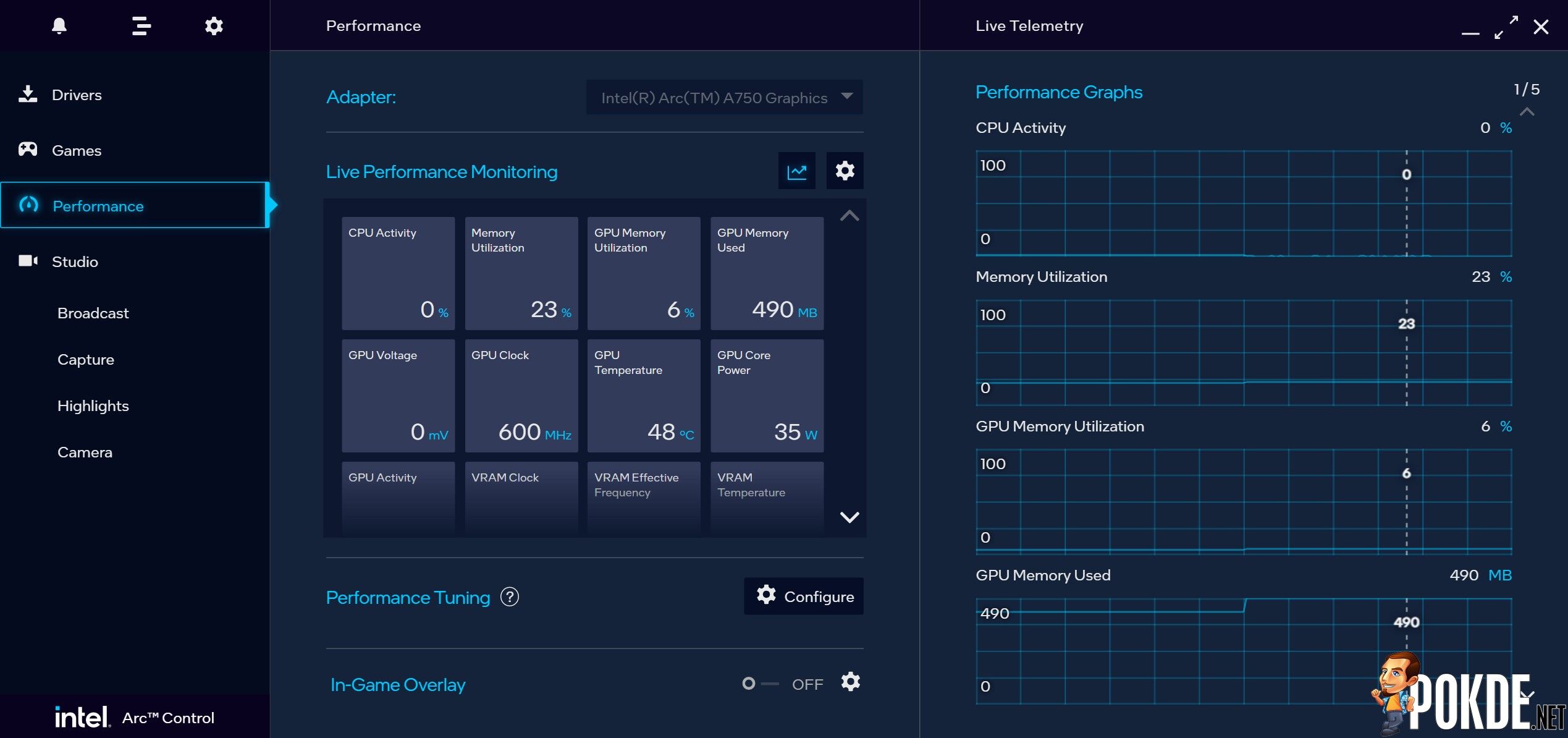
Once the installation is complete you are greeted with Intel’s control software of choice called Arc Control. It’s not the most robust control app, though it’s miles ahead than what NVIDIA GeForce Experience can provide (while AMD’s software is what I consider the most comprehensive right now). Still, it’s fairly simple to navigate through the menus – though I did encounter app crashes just about once or twice, but it’s not too big of an issue compared to very first software release from last year. Overall, the software experience is pretty smooth as Intel took time to polish the edges.
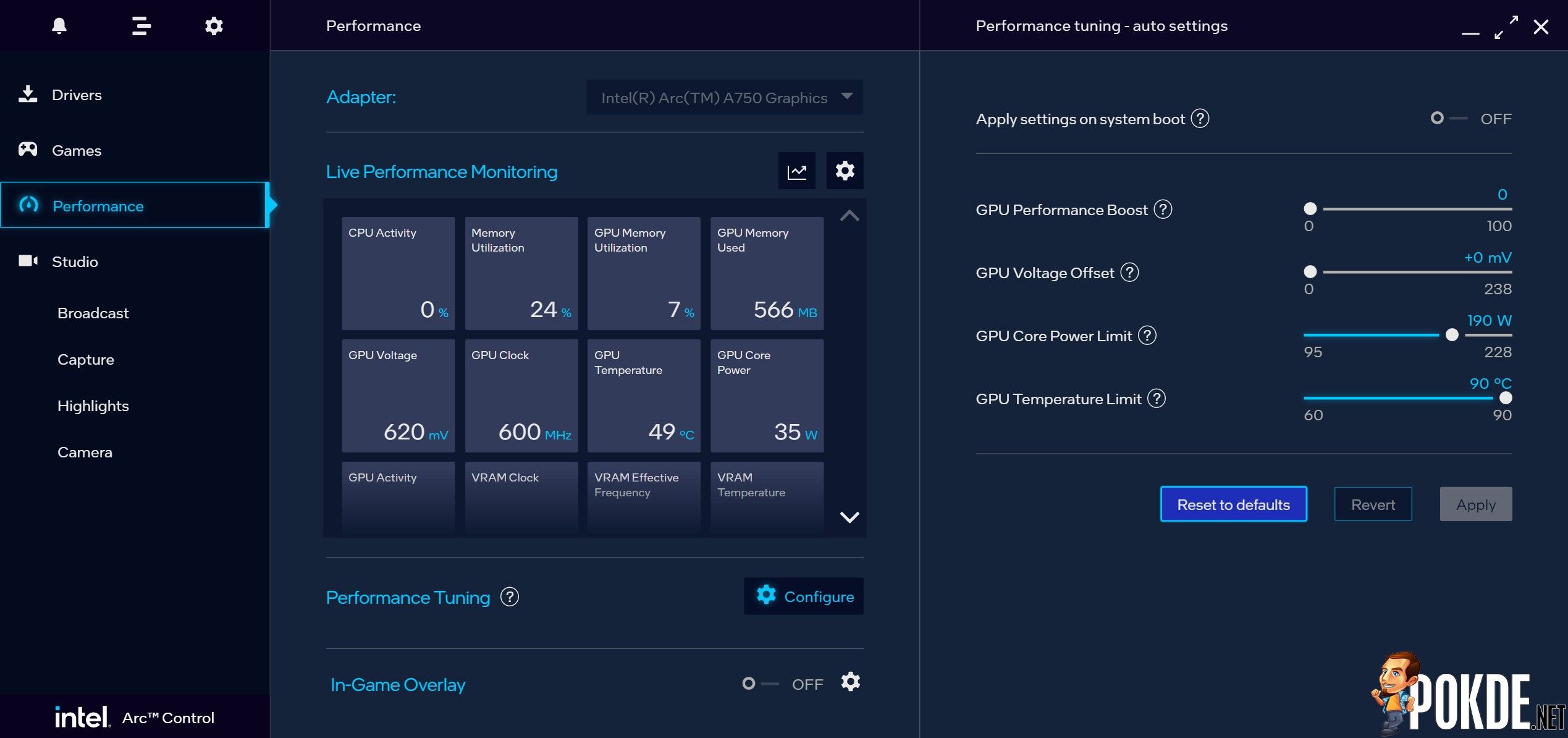
Tuning the GPU is pretty straightforward – in fact the it’s the easiest to understand among all three vendors. NVIDIA users pretty much have to rely on third-party software for tuning, while AMD Software does have tuning options available, it’s slightly less intuitive in presenting the numbers (e.g. the TDP slider is represented in percentages instead of actual TDP). Here on Arc Control you get to tune four major parameters of the GPU, and you can tune the TDP to exactly where you want it to be. (Note: despite the ‘225W’ official TDP rating, this GPU runs on 190W by default.)
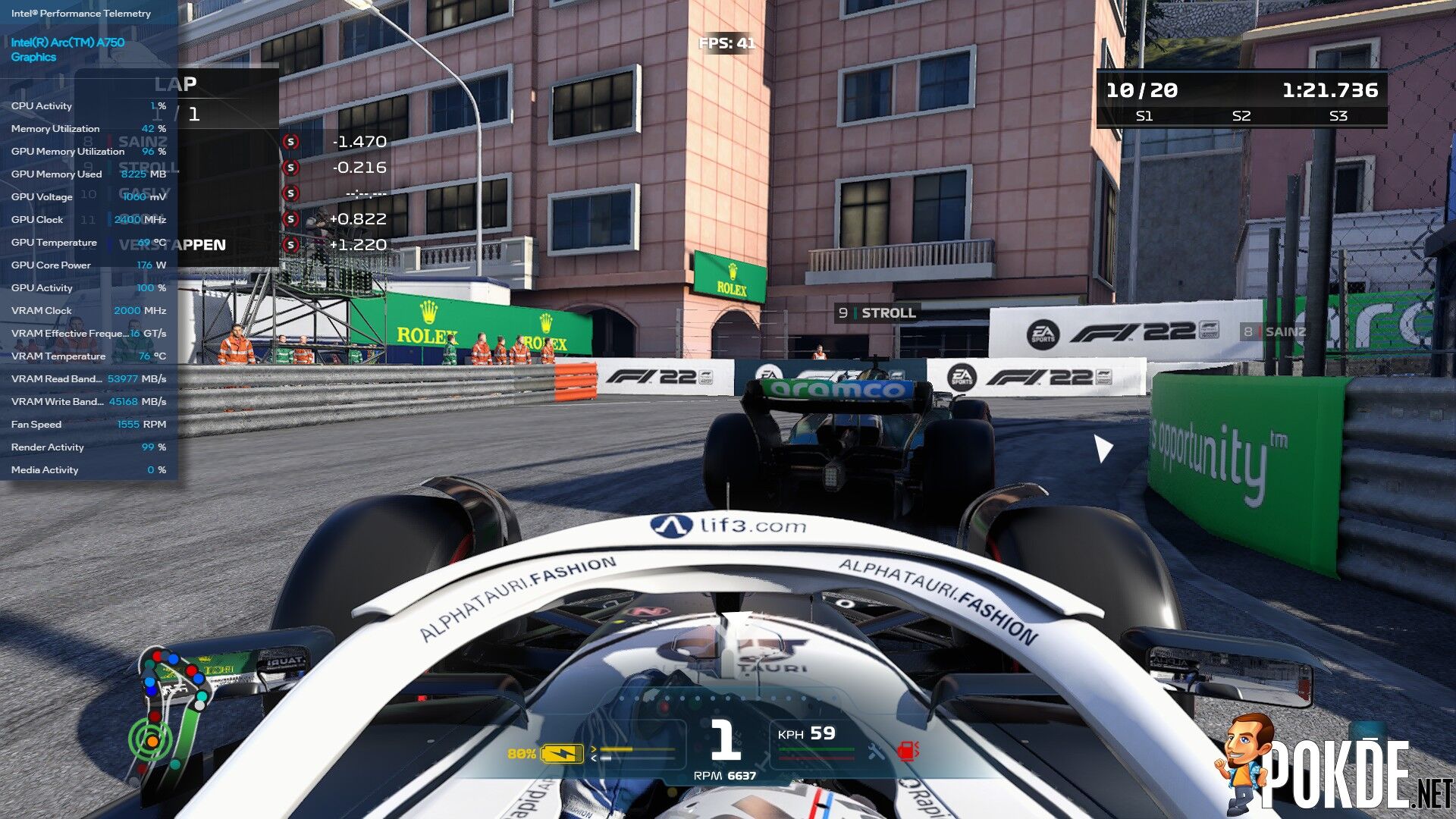
You can fire up the in-game telemetry through Alt+R shortcut, which shows plenty of data here. However, Intel seems to forgot to include FPS counters so this might not be entirely useful for some users. If you do need to monitor frames but the game doesn’t have built-in counters, you’ll have to use third-party software such as MSI Afterburner/RTSS.
Specifications
Intel Arc A750
| GPU Core & VRAM: |
|
| GPU Core Variant | ACM-G10 |
| Microarchitecture | Xe-HPG “Alchemist” |
| Process Node | TSMC N6 |
| Transistors | 21.7 billion |
| Die size | 406mm² |
| Execution Units (EUs) | 448 |
| Stream Processors | 3584 |
| Ray Tracing Units | 28 |
| Cache | 16MB L2 |
| VRAM Configuration | 8GB GDDR6 256-bit |
| Memory Bandwidth | 16Gbps, 512GB/s peak |
| Add-in board: | |
| Base/Boost Clock | 2050 / 2400 MHz |
| TDP (TBP) | 225W |
| Recommended PSU | N/A |
| Dual BIOS Mode | No |
| Display Outputs | 3x DisplayPort 2.0 (UHBR 10) 1x HDMI 2.1 *Max output resolution: 7680×4320@60Hz |
| Power Connector | 1x 8-pin + 1x 6-pin PCIe connector |
| Bus Interface | PCIe 4.0 x16 |
| Dimensions | 2-slot, 279.9 x 111.2 x 42.0 mm |
Test System
| CPU | Intel Core i9-13900K |
| Cooling | ASUS ROG Ryujin II 360 AIO Cooler Master MasterGel Maker |
| Motherboard | ASUS ROG Maximus Z790 HERO |
| GPU | Intel Arc A750 |
| Memory | Kingston FURY RENEGADE RGB DDR5-6400 CL32 (2x16GB) |
| Storage | Samsung SSD 980 PRO 256GB (Boot) Kingston NV1 1TB |
| Power Supply | Cooler Master MWE Gold 1250 V2 Full Modular 1250W |
| Case | VECTOR Bench Case (Open-air chassis) |
| Operating System | Windows 11 Pro 22H2 |
Performance
All benchmarks are done in out-of-the-box settings, unless otherwise specified. Games are tested under these settings (upscaling features such as AMD FSR, Intel XeSS are turned off):
- Forza Horizon 5 (RT ON)
Maximum settings (all settings maxed out to EXTREME preset when available, Ray Tracing set to EXTREME). - Forza Horizon 5 (RT OFF)
Ultra High preset – Ray Tracing turned off. - Red Dead Redemption 2
All settings set to ULTRA – slightly higher quality over ‘Favor Quality’ from the in-game settings slider. - Shadow of the Tomb Raider (RT ON)
HIGHEST preset. RT Shadows set to ULTRA (which overrides default Shadow settings). - Shadow of the Tomb Raider (RT OFF)
Same as the previous run – with the exception of RT Shadows turned OFF, with Shadow settings set to ULTRA instead. - F1 2022 (RT ON)
ULTRA HIGH preset. Ray Tracing is set to HIGH under this preset.
Synthetic Benchmarks
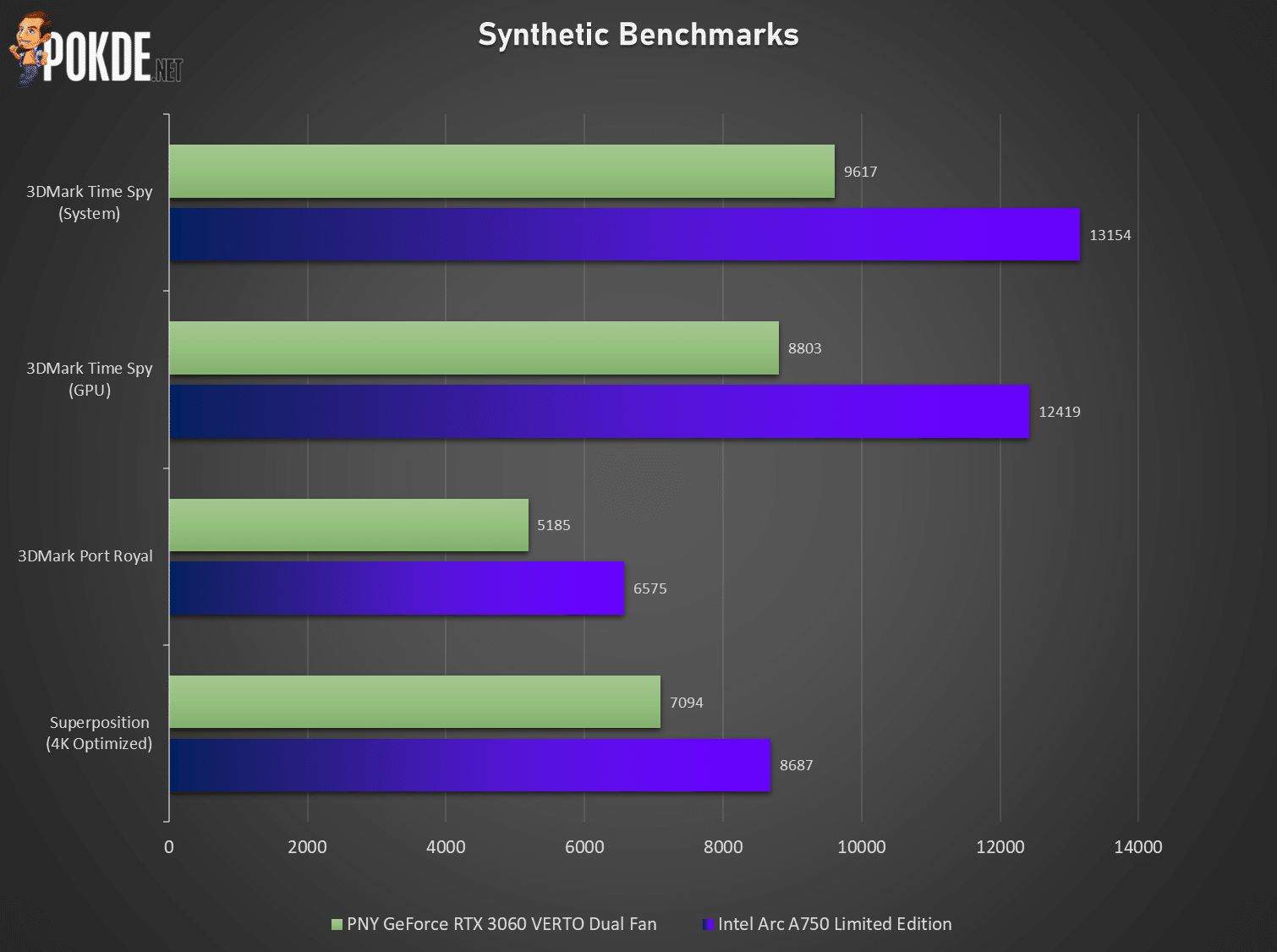
In theory – the Intel Arc A750 looks like a fast card. While on synthetic benchmarks the Arc has beaten the RTX 3060 outright, it won’t be the case when actual gaming is involved (optimizations, drivers and even the GPU architecture itself plays a significant role in GPU performance). How does the Arc A750 stack up against the most popular RTX 30 series GPU? Keep reading.
Gaming – 4K (3840×2160)

Strictly speaking, the Intel Arc A750 is not designed for 4K – it’s simply not powerful enough for that (XeSS is another subject). Still, for science – we pitted it against NVIDIA’s RTX 3060 (in PNY’s form) to see how it stacks up. With the way both cards trade blows, it’s somewhat behaving similar to AMD’s equivalents in terms of performance.
Intel’s RTUs (ray tracing units) aren’t as matured as NVIDIA’s just yet, but the gap isn’t too far back to the RTX 3060; and the only win it got is courtesy of Red Dead Redemption 2, which AMD cards has been more advantageous against the Team Green cards as well.
F1 2022 in this case is merely a scientific test, but here we can see what happens when VRAM runs out. The Arc A750 lost nearly half the performance against the RTX 3060 which is out of line from the usual figures; the 12GB VRAM offered by NVIDIA has proved to be useful in a VRAM-heavy scenario like this. Though this is 4K Ultra quality we’re talking about – so realistically this isn’t much of a concern anyway.
Gaming – 1440p (2560×1440)
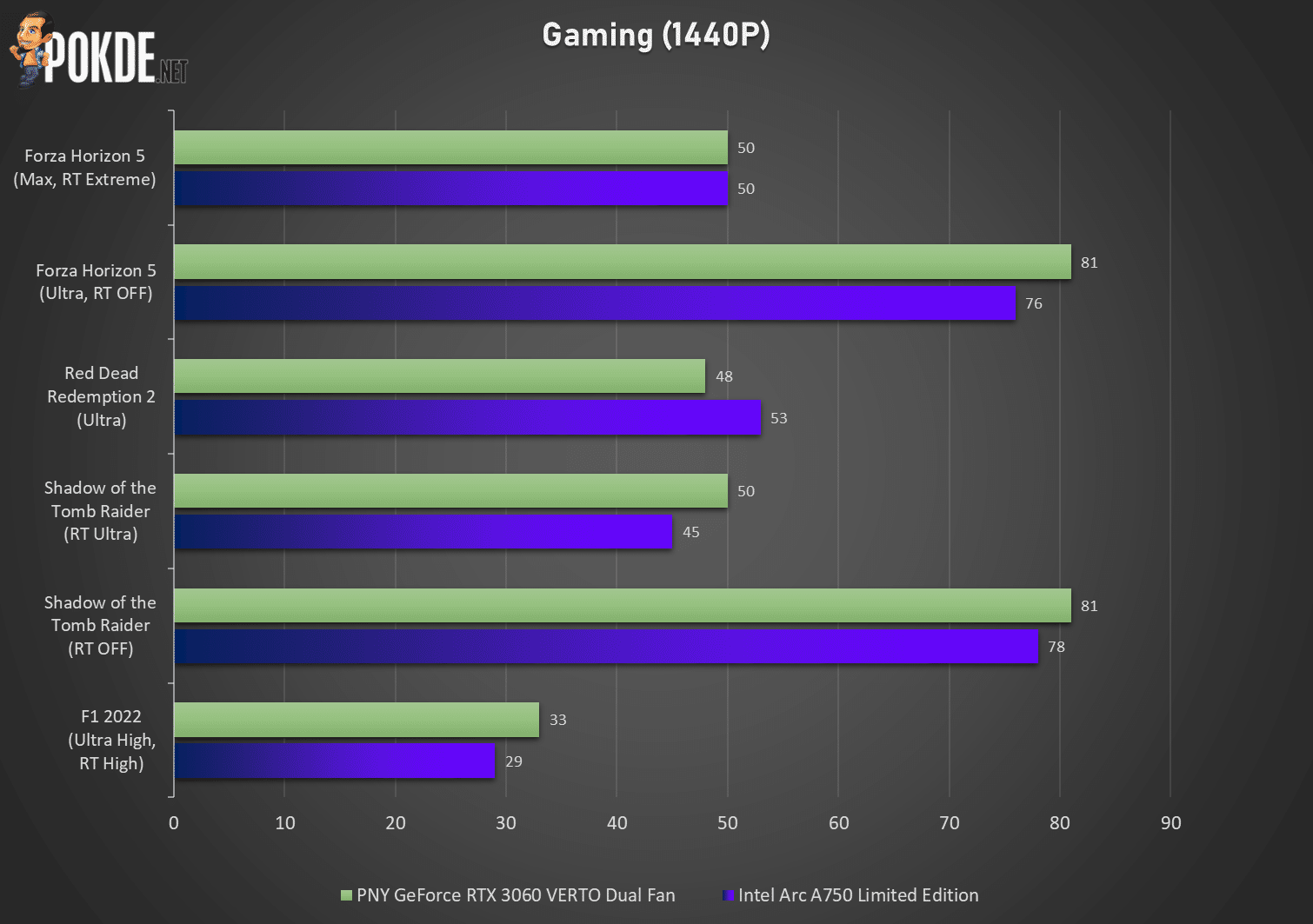
Down to 1440p – Intel managed to largely kept pace with NVIDIA despite minor losses across the board. Still, RDR2 once again has given the A750 the only win in this suite of benchmarks. Most games should run fine at this resolution if you keep your graphics quality reasonable, and F1 2022 represents the worst-case scenario as far as GPU workloads go (with ray tracing and native rendering).
Interestingly, Forza Horizon 5 sees the Arc A750 achieved dead heat against the RTX 3060 despite maximum ray tracing settings. Our assumption is the optimization at work – remember, in synthetic benchmarks Intel are much more “powerful” on paper, but optimizations (or lack thereof) has seemingly held back the card’s true potential.
Gaming – 1080p (1920×1080)
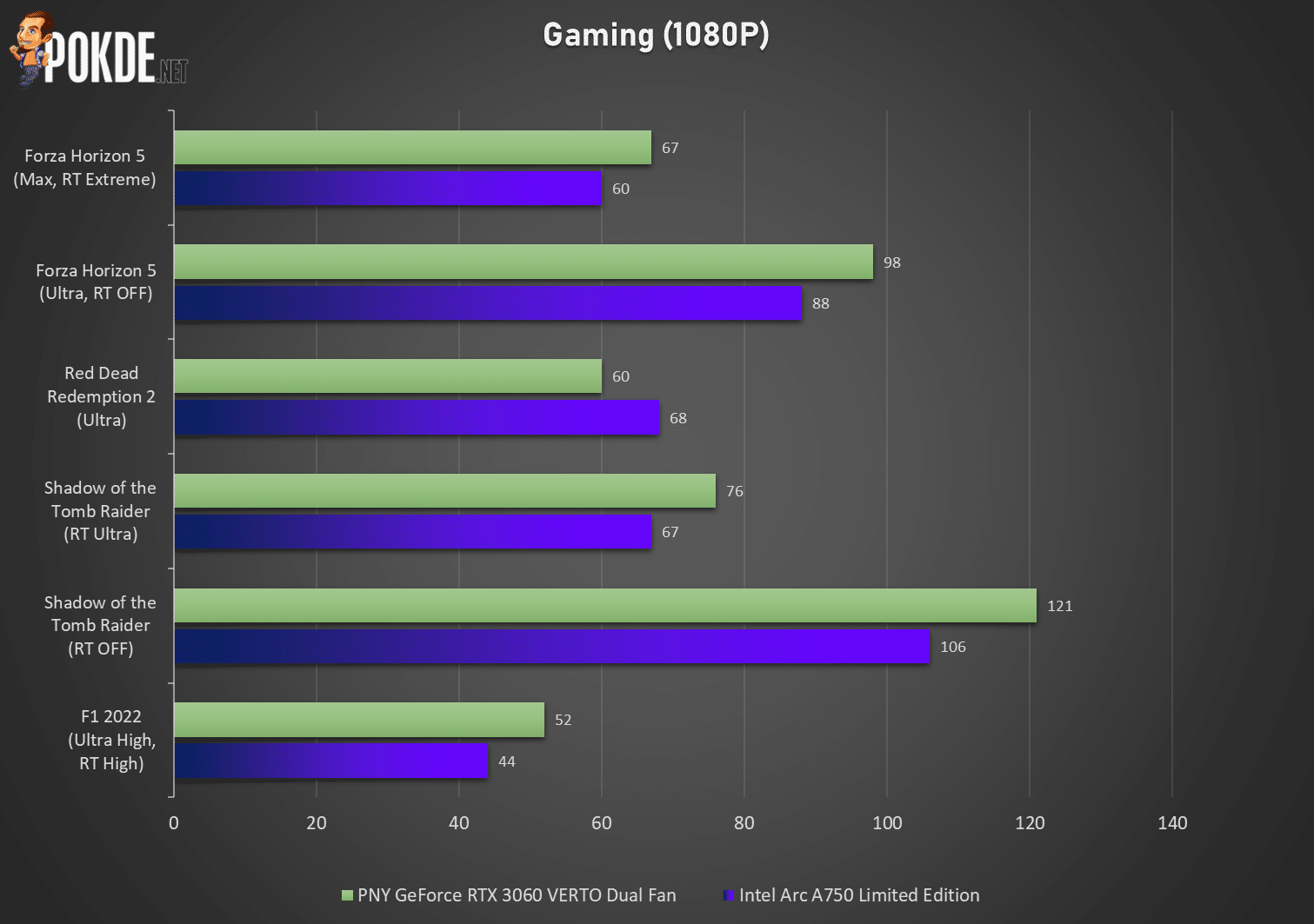
Finally, 1080p gaming. This is likely where most owners of Arc A750 will play on, so here’s some numbers for reference for any future A750 owners. Generally, if you prefer quality over framerates, the Arc A750 can pretty much universally achieve 60FPS across the board if the game itself isn’t too demanding on GPU performance.
The performance scaling down to this resolution has disadvantaged the Intel card ever so slightly more, but it depends on the games you play. RDR2 again favors the Intel card, but for other games it’s pretty much Team Green’s ground.
Thermals
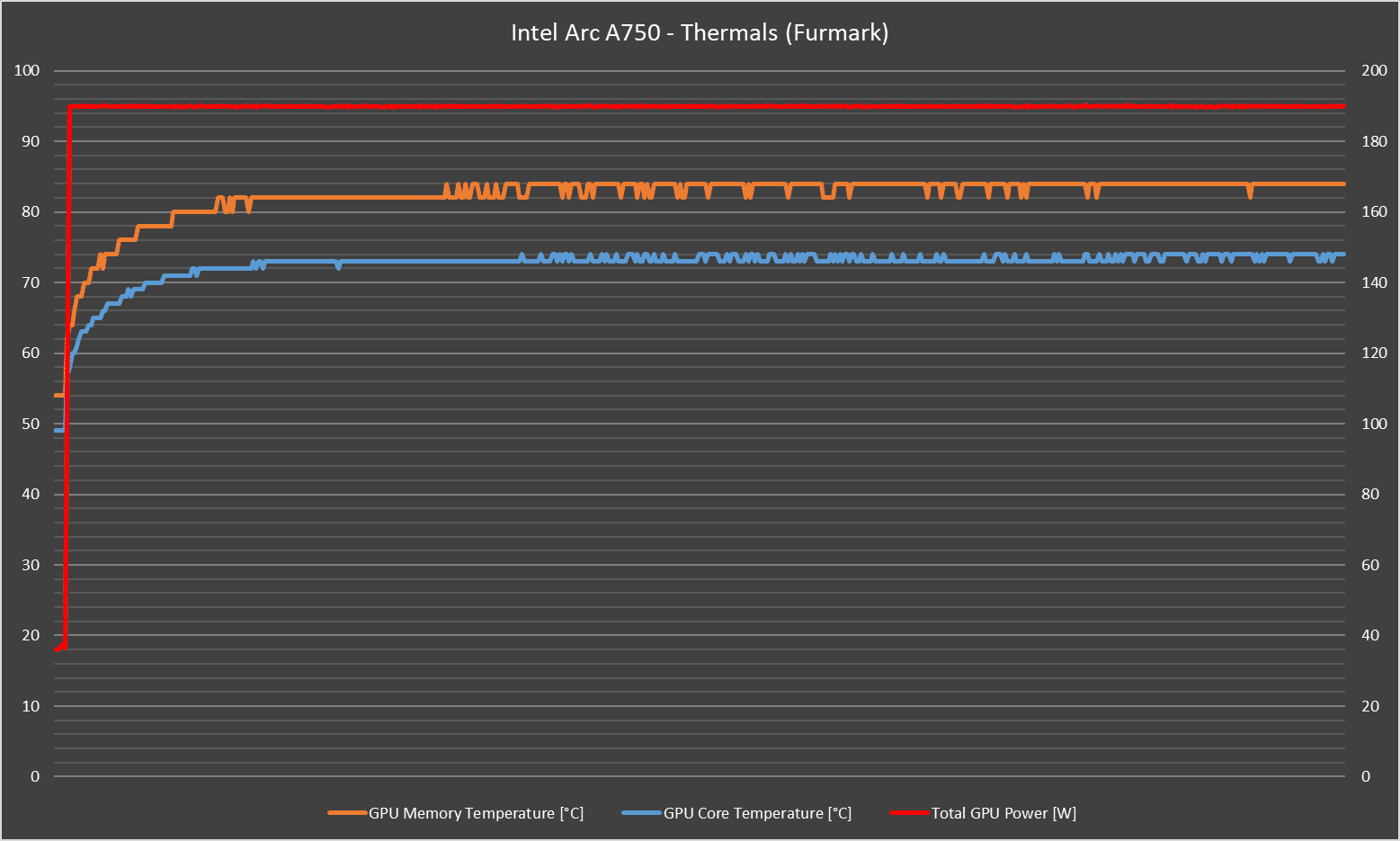
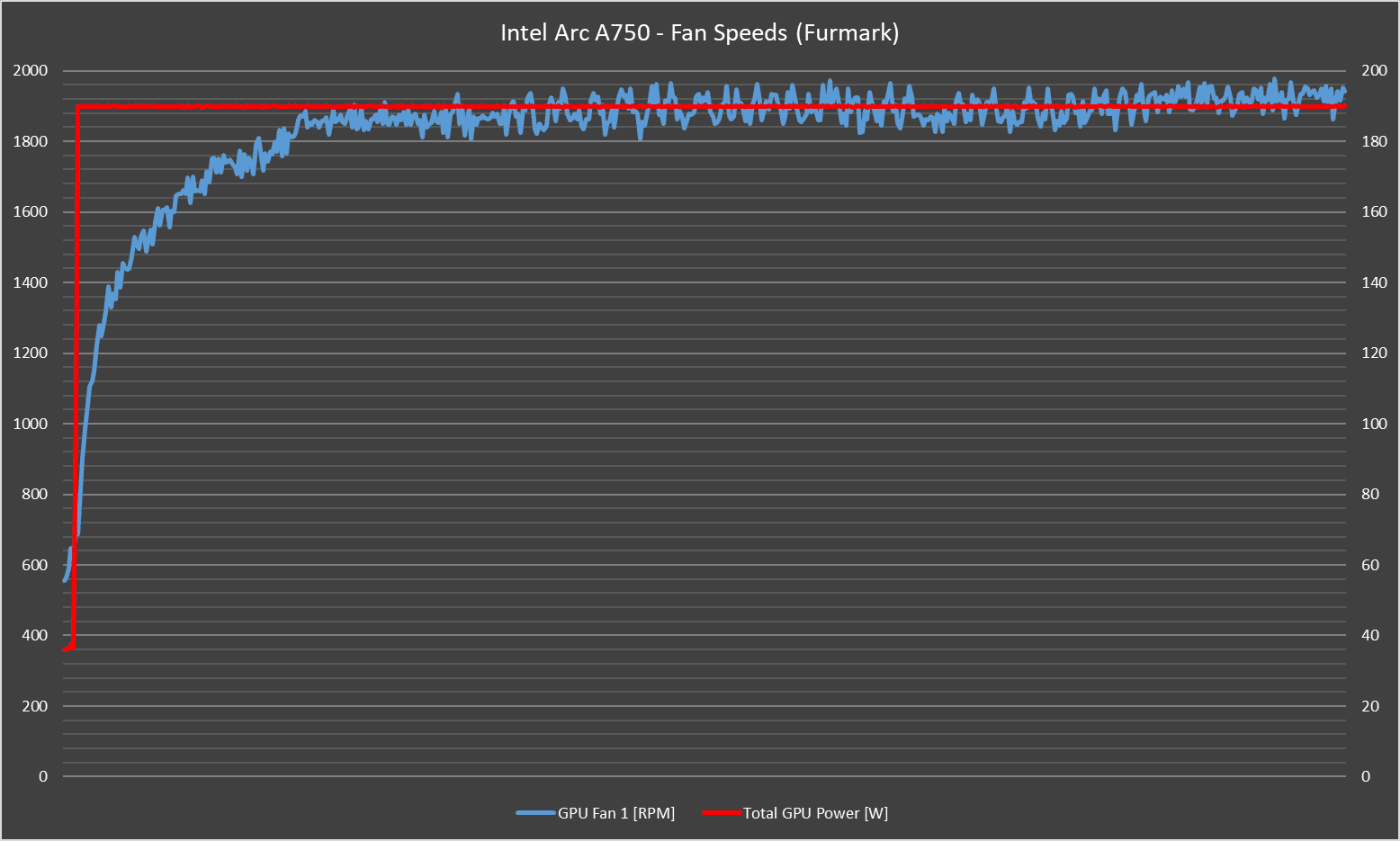
Since Intel doesn’t have too much experience in discrete graphics yet (their iGPU experience doesn’t really transfer to the dGPU that much), there’s still some work to do in terms of telemetry and monitoring aspects. The Arc A750 doesn’t have hotspot sensors like AMD and NVIDIA does – so the temperature we have here is likely the ‘overall’ figure.
Few things: despite Intel officially classify the Arc A750 as the 225W card, in practice it does not pull that amount of power. By default (seen in Arc Control), the target TDP/TBP is 190 watts – for which this card’s cooler handled perfectly fine at just 74°C by the end of the 10th minute in this Furmark stress test. Remember the power slider? We tried to pull 228W – the maximum allowed by software – and unsurprisingly it thermal throttled halfway through the test.
Still, given the fan speeds, which is slightly on the high side but remains subtle on noise, you may be able to push it to 200-210W depending on your room conditions and even the silicon lottery itself. Perhaps a custom fan curve may sort this out, but we haven’t seen Arc Control providing such controls just yet.
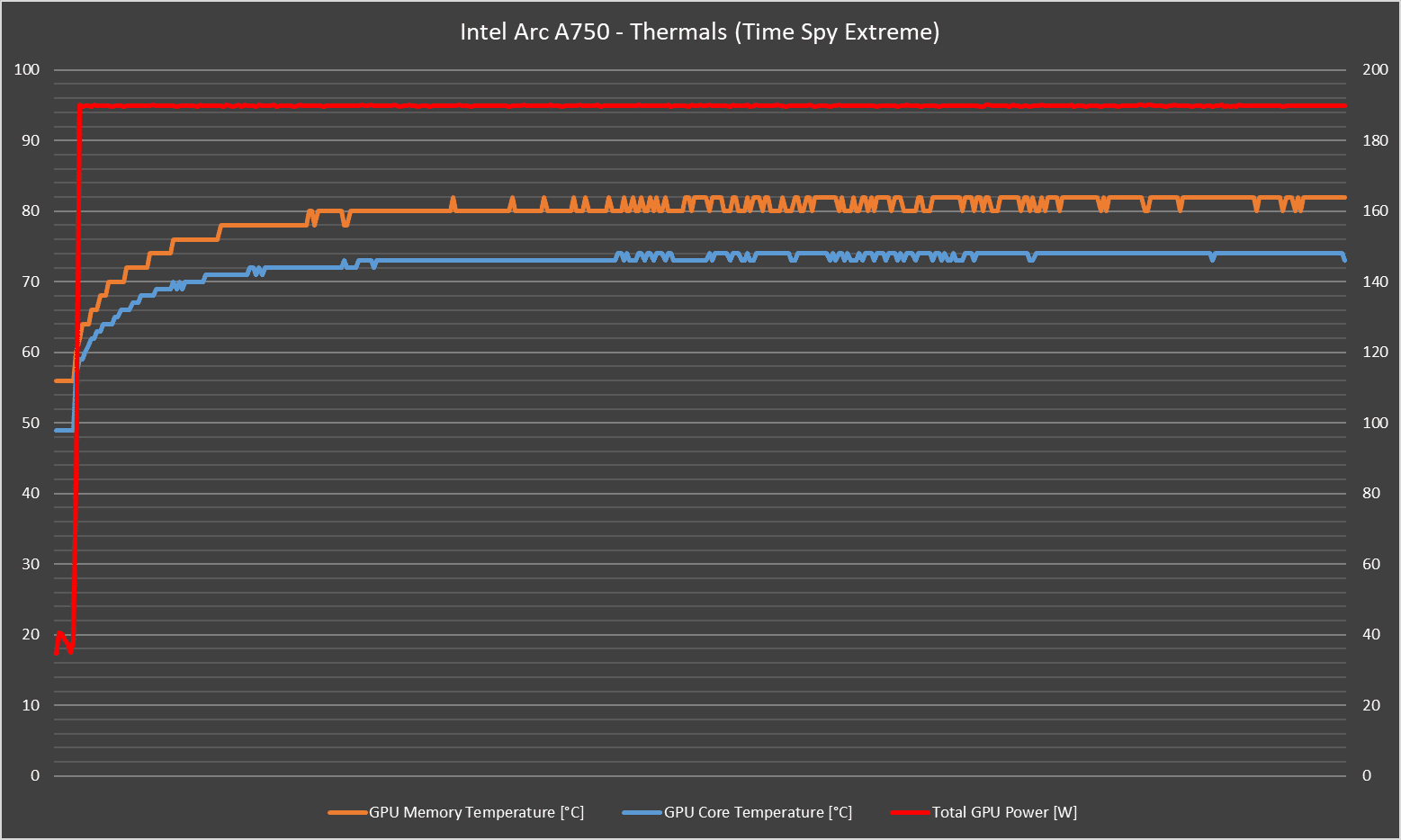
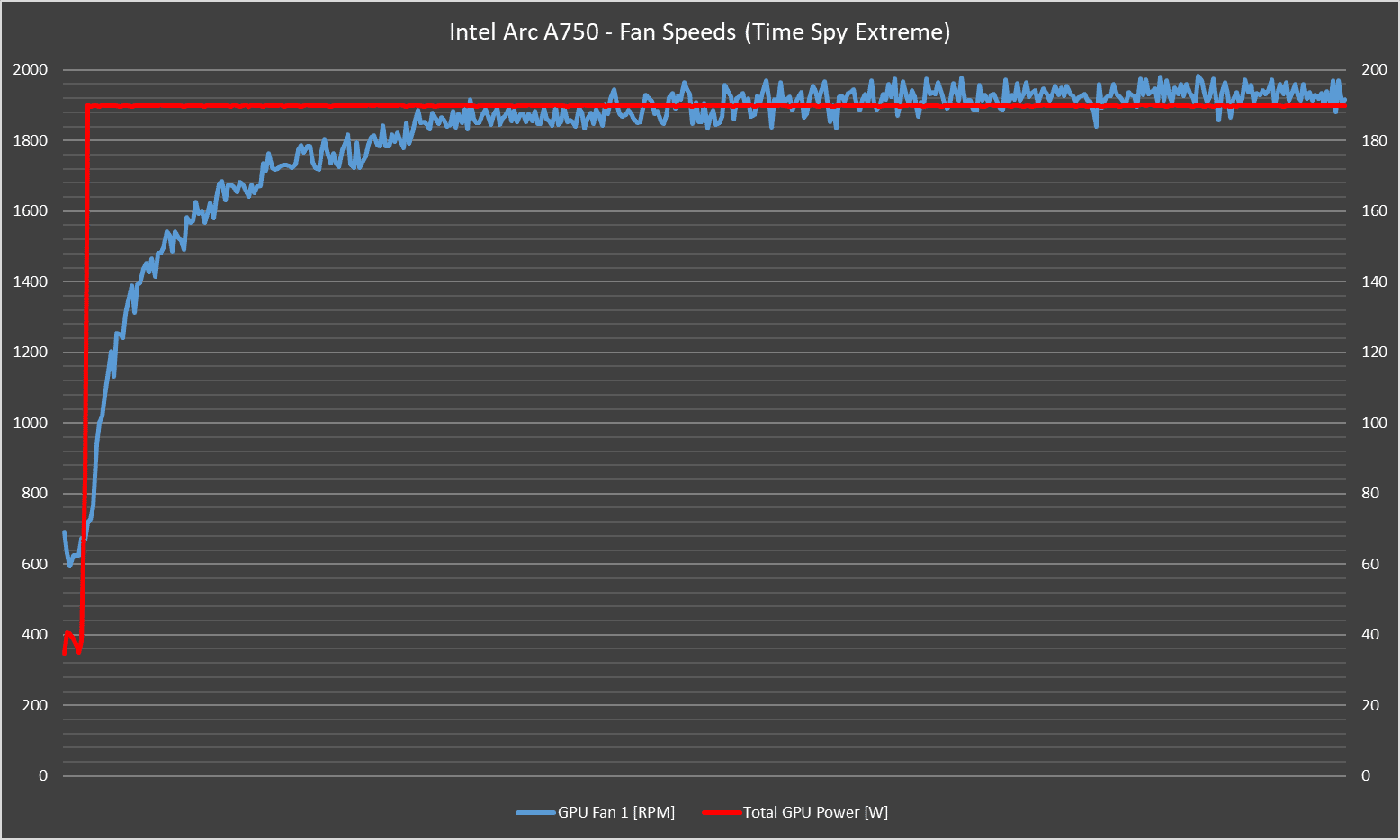
Next is Time Spy Extreme stress test. The VRAM temperatures actually runs slightly lower than Furmark’s results (82°C vs 84°C), and with it we’ve seen the fans picking up slower to the stable state of around 1,950RPM or so. Oddly enough, the fan speeds seems to fluctuate more than most other cards do (same happens to Furmark); but in practice this is not noticeable in any way.
Conclusion
Intel’s GPU efforts doesn’t come easy – from the very first DG1 GPU to laptop’s Iris Xe Max graphics, there’s a lot of bugs to squash and plenty of games to optimize on (which they have to do practically from scratch, something that both AMD and NVIDIA has built for over 20 years). For its first attempt at entering the gaming GPU market, it’s had it fair share of issues during launch too, riddled with major bugs and errors on software and in-game.
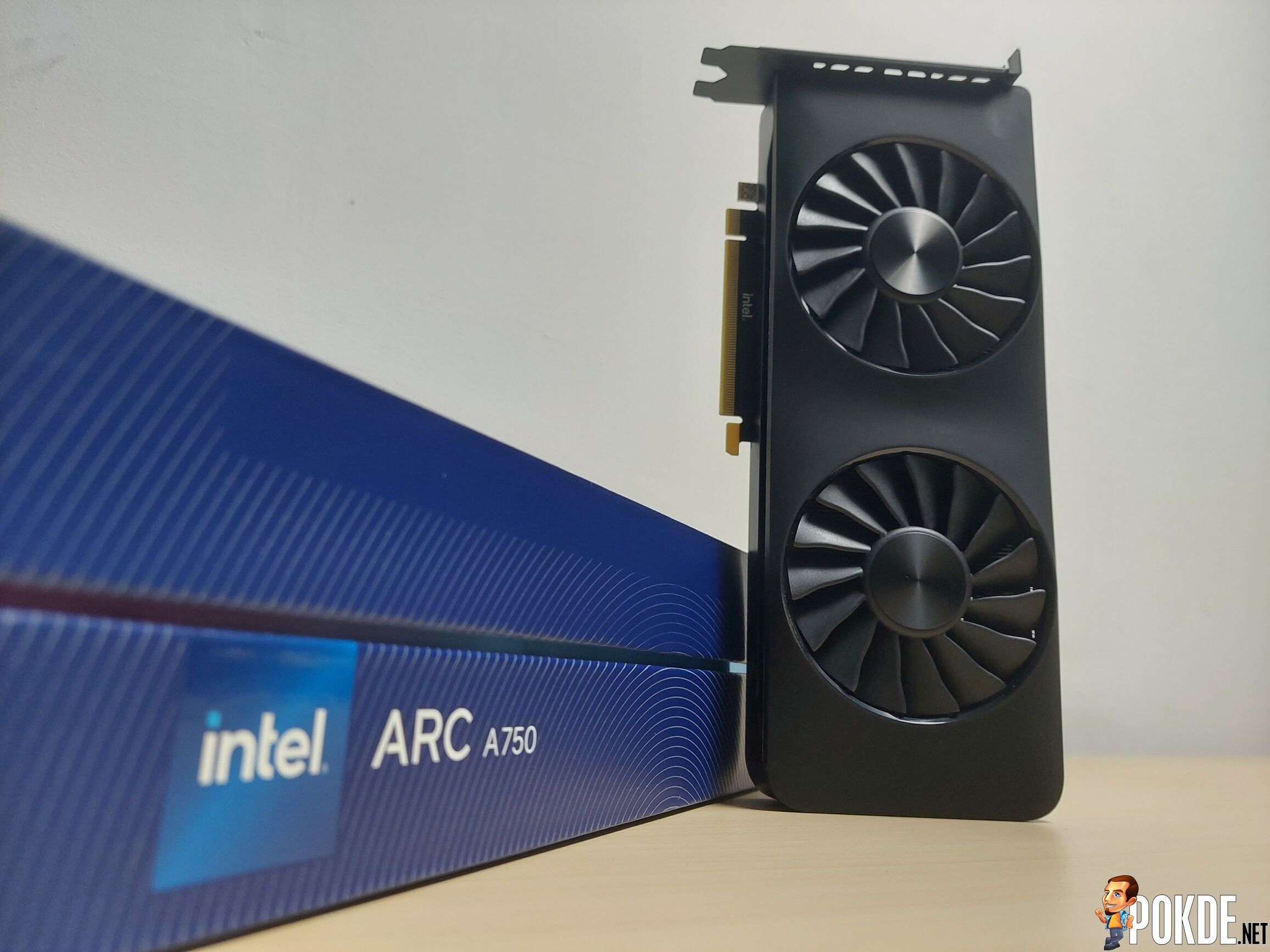
The company has been hard at work in optimizing and fixing the driver, and we’ve seen good progress. At this writing, the Intel Arc is more than half a year old since the release of its very first Arc GPU, and based on our current testing we didn’t find too many issues that was first experiences by those who got the cards way before us. They’ve got a solid foundation to work on – so it’s time to see where Intel will go next.
As for the Arc A750 itself, it’s pretty respectable. While the performance isn’t quite there compared to the very popular RTX 3060, one thing it does have is the price advantage. At RM1,399 (some listings go as low as RM1,200+), it’s significantly cheaper than various AIB versions of RTX 3060 which generally spans across the mid-to-high RM1K range. In turn you get performance that is almost on par with the Team Green card – and the unlocked TDP can provide even more if your cooler can handle it.
Now, it’s not perfect – just like Rome isn’t built in a day, GPU drivers aren’t either. DX11 games will most certainly took a heavier performance hit as Intel’s priorities is to optimize new (DX12) games and popular DX9 games, so if your game library contains some of the more obscure titles, make sure you know what you’re dealing with.
So, is this a good start for Intel? In retrospect, while the early release bugs really shouldn’t make it out into retail units in the first place, at least the improvements made so far has make this card much more livable and may start offering some pretty enticing propositions to attract Team Green and Team Red owners in the wake of ever increasing GPU prices. If you want the Player Three to give both AMD and NVIDIA a good run for their money – perhaps this card may be your next one.

Special thanks to Intel Malaysia for providing us the Arc A750 for the purpose of this review.


![[UPDATED: Statements] Forza Horizon 6 Dev Drops Multi-Millennial Ban Hammer To Cheater Before The Game Has Even Released - 108](https://cdn.pokde.net/wp-content/uploads/2026/05/12022254/fh6leakpermabancover-420x280.jpg "[UPDATED: Statements] Forza Horizon 6 Dev Drops Multi-Millennial Ban Hammer To Cheater Before The Game Has Even Released - 109")


