


Arzopa G1 Game Review – 144Hz Portable Monitor
-
Appearance - 8.5/10
8.5/10
-
Features - 8/10
8/10
-
Materials - 7.5/10
7.5/10
-
Performance - 7/10
7/10
-
Portability - 8.5/10
8.5/10
-
User Experience - 6/10
6/10
-
Value - 7.5/10
7.5/10
Summary
The Arzopa G1 Game portable monitor is certainly great if you want a secondary monitor on-the-go or just want to view things in a bigger display for some devices but it’s definitely not meant for professional work.
Overall
7.6/10Pros
+ Light and easy to bring around
+ Nice carbon fiber-esque look
+ Good array of ports
+ No battery = less worries for wear and tear
+ 144Hz refresh rate
+ Supports AMD FreeSync
Cons
– Needs calibration for colour accuracy, but it’s a bit too dim for professional work
– Speakers are lacking in quality
– No touchscreen
– Flimsy magnetic flip case
Unboxing the Arzopa G1 Game

Starting off the Arzopa G1 Game review with the unboxing, the packaging itself looks very basic, especially since its clad in white. When you open the box however, the content inside are neatly arranged in their own respective boxes, as if puzzle pieces that fit perfectly together. Inside, you can expect to find the following items:
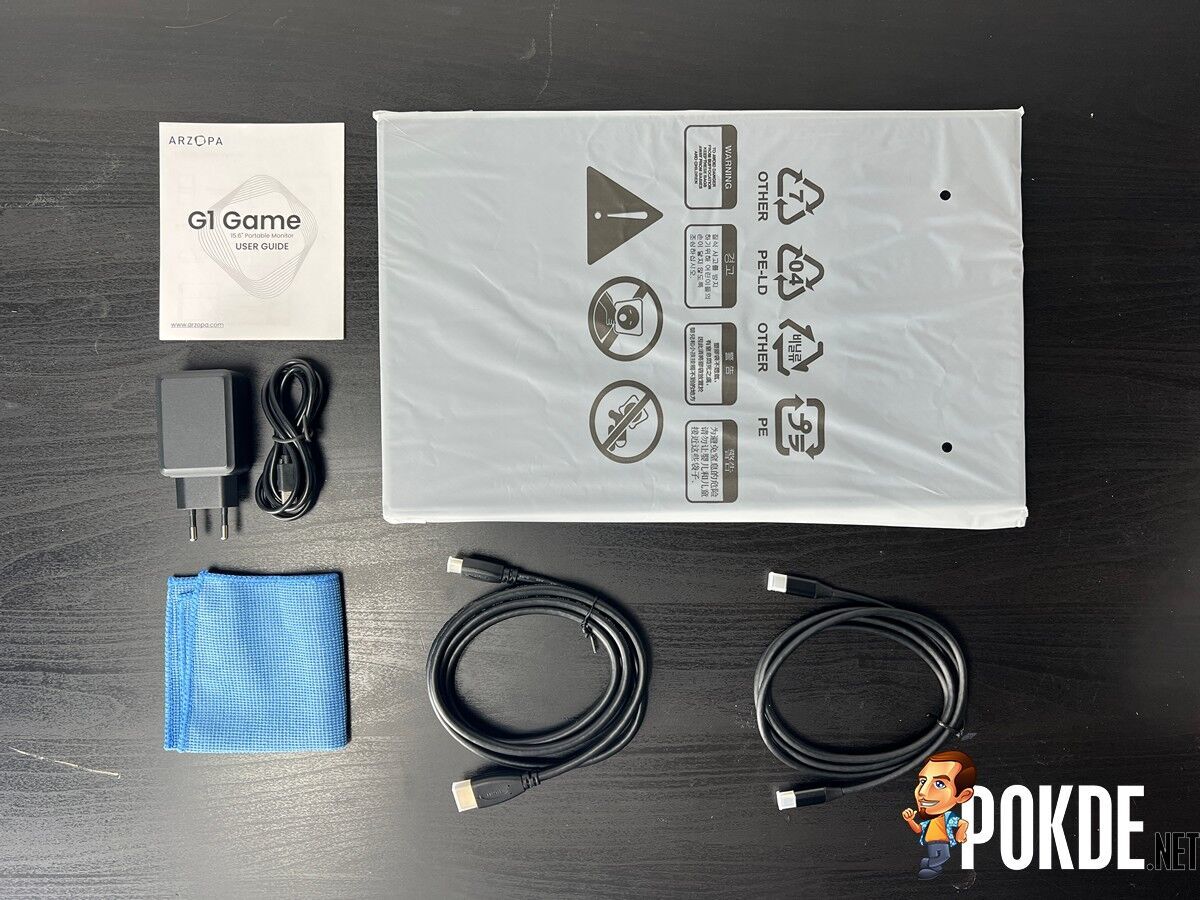
- 1 x USB-C to USB-C Cable
- 1 x Mini HDMI to HDMI Cable
- 1 x USB-C to USB-A Cable
- 1 x Screen Cleaning Cloth
- 1 x User Guide
- 1 x ARZOPA 15.6″ Portable Monitor
Specifications
| Panel Size | Wide Screen 15.6″, 16:9 |
| Panel Type | IPS |
| True Resolution | 1920 X 1080 |
| Display Surface | Non-glare |
| Touchscreen | No |
| Pixel Pitch | 0.179 mm |
| Brightness | 300 cd/m2 |
| Contrast | 1000:1 |
| Viewing Angle (CR≧10) | 178°(H) / 178°(V) |
| Response Time | 5 ms (GTG) |
| HDR Support | No |
| Refresh Rate | 144 Hz |
| Low Blue Light | Yes |
| HDCP Support | Yes |
| Viewing Modes | sRGB, Scenery, Theater, Standard, Night View, Game, Reading, Darkroom |
| Adaptive Refresh Rate | No |
| Signal Input | 1 x Mini HDMI 1.4 2 x USB-C 1 x 3.5mm audio jack |
| Audio | Built-in dual speakers |
| Mechanical Design | Chassis Colours : Dark gray Slim Design : Yes Super Narrow Bezel Design : Yes |
| Dimensions | 364.9 x 274.8 x 8.9 mm, 0.61 kg |
Performance
The brightness of the display when measured at 100% brightness is 286.1cd/m2, and it was running at this setting by default. It’s a bit on the dimmer side but it’s still usable provided you’re not looking at it right under bright sunlight

Running the display uniformity test with a 3×3 grid, I’m actually surprised by how well the Arzopa G1 Game fared. It’s actually even across all areas, practically speaking. In fact, it’s almost perfectly uniformed here, something we haven’t seen in a long time.
Colour Accuracy
| Standard | Standard mode, calibration with DisplayCAL | |
| Whitepoint | 8400K | 8300K |
| Average ΔE*00 | 1.45 | 0.35 |
| Maximum ΔE*00 | 4.95 | 1.66 |
By default, the colour accuracy on the Arzopa G1 Game could fluctuate quite a bit but it’s not terrible. After calibrating it using SpyderX and DisplayCAL, we see significant improvements in average and maximum Delta-E figures. As good as it might seem on paper however, the display is a bit too dim for proper professional work.
Gamut
| Gamut | Standard | Standard mode, calibration with DisplayCAL | |
| sRGB | Coverage | 99.6% | 99.7% |
| Volume | 108.4% | 109.1% | |
| Adobe RGB | Coverage | 71.2% | 74.4% |
| Volume | 72.7% | 76.2% | |
| DCI-P3 | Coverage | 75.8% | 76.5% |
| Volume | 75.8% | 76.5% | |
For the gamut coverage and volume, there were slight improvements after calibration. Overall with 99% sRGB, 72% Adobe RGB, and 76% DCI-P3, the colours are certainly lacking for professional creative work. However, I would cut them some slack since this is a low-powered monitor, and achieving this result is already a pleasant surprise for me.
The Good

The Arzopa G1 Game is very easy to bring around. This might sound dumb or redundant given that it’s a portable monitor but you’d understand when you see it in person. It’s ultrathin and it’s very light so it barely adds bulk to what you’re carrying. Given the added productivity potential, it’s worth just having it around wherever you go. The carbon fiber-esque look is a bonus.
It also has a good array of ports as it comes with a mini-HDMI port, two USB-C ports, and a headphone jack. It’s enough to offer versatility across a multitude of devices, including smartphones. The necessary cables are also included so you don’t have to worry about purchasing extra accessories.

In terms of performance, apart from what we’ve already measured, the Arzopa G1 Game certainly sets a high standard for portable monitors with its 144Hz refresh rate. Sure, the devices that can make use of it are likely limited to laptops with adequate power but it does provide some form of futureproofing for when other devices are capable of pushing the necessary frames for it. Imagine a Nintendo Switch successor with this monitor.
It’s also worth pointing out that the Arzopa G1 Game supports AMD FreeSync. This is revolutionary for portable monitors as it would typical be saved for a traditional, performance-oriented gaming monitors. In essence, you get to enjoy a tear-free visual experience no matter where you go.



For those of you who are wondering, the Arzopa G1 Game doesn’t have a built-in battery. Instead, it relies on USB-C for power. To me, this is a good thing because it minimizes the risk of the product prematurely dying, especially since batteries are the most prone to wear and tear. It’s just plug-and-play and I’m certain this can last for several years with ease unless you get clumsy.
The Bad

While I would give the included flap cover props for a smart design as it fits nicely with the design of the monitor given the raised surface on the ports side, I find it more annoying than useful. For starters, it only works with one standing orientation and nothing more. Then, the magnetic attachment is rather flimsy so it can fall of rather easily. In fact, I’ve had it slip off while having it stand up, and that’s not good.
Then, it lacks touchscreen support so if you’re using it to extend your smartphone display, you’re only using it to see things bigger and that’s it. Having touchscreen would be nice not only because of that, but it will also add extra functionality and versatility for laptops, especially gaming laptops which typically lack touchscreen.

To our surprise, the built-in speakers can pump out rather loud volumes. However, it is lacking in depth, bass, and anything that would make it immersive or enjoyable. This is more so an option for situations where you don’t really have much of a choice for audio, but that’s fine for me. I just feel that it’s worth pointing out.
Arzopa G1 Game Review
The Arzopa G1 Game portable monitor offers a lot for the price. It’s certainly great if you want a secondary monitor on-the-go or just want to view things in a bigger display for some devices but it’s definitely not meant for professional work. Sure, it has its drawbacks but for its price of USD $209.99 (RM976.87), you can’t really complain.
At the end of our Arzopa G1 Game review, I award this portable monitor with our Silver Pokdeward.

Big thanks to Arzopa for sending us this portable monitor for the purpose of this review. If you’re interested in getting one yourself, click right here. We even have a special RM20 Shopee discount coupon (valid for 3 months) for you so you can save some money. The coupon code is: “NANQ10J20″. They are having Prime Day promotions from 12th to 13th October 2022 so head on over to their official website for more discounts and promotions.


