


Samsung Galaxy S22 Ultra Review – The Noteworthy Spiritual Successor
-
Appearance - 8.5/10
8.5/10
-
Efficiency - 8/10
8/10
-
Features - 9/10
9/10
-
Materials - 9/10
9/10
-
Performance - 9/10
9/10
-
Portability - 7.5/10
7.5/10
-
User Experience - 9/10
9/10
-
Value - 8/10
8/10
Summary
In the case of the Samsung Galaxy S22 Ultra, it’s actually worth upgrading over the Galaxy S21 Ultra for one simple reason; built-in S Pen with full functionalities.
Overall
8.5/10Pros
+ Snapdragon 8 Gen 1 boasts excellent performance
+ Good battery life
+ Dual speakers sound great
+ Improved camera performance
+ Even better adaptive refresh rate
+ Solid build quality
+ Under-display fingerprint scanner works great
+ Matte finish
+ Built-in S Pen with full functionalities
+ Brighter OLED display
Cons
– Some heating issues due to the chip
– Telephoto and ultrawide cameras are still a step below the main camera
– No headphone jack
– No memory card slot
– Pricey
Unboxing the Samsung Galaxy S22 Ultra

The Samsung Galaxy S22 Ultra has a packaging that’s very similar to last year’s top-of-the-line flagship by the Korean giant. It’s a slim black box with design patterns which clearly show the series that it belongs to. The reason it’s slim, as you might have expected by now, is because it lacks a charger. Inside the box, you can find the following items:

- USB-C to USB-C cable
- SIM ejector pin
- Quick Start Guide
- Regional Lock Guide
- Samsung Pay leaflet
- Warranty card
- The Samsung Galaxy S22 Ultra smartphone itself
Appearance
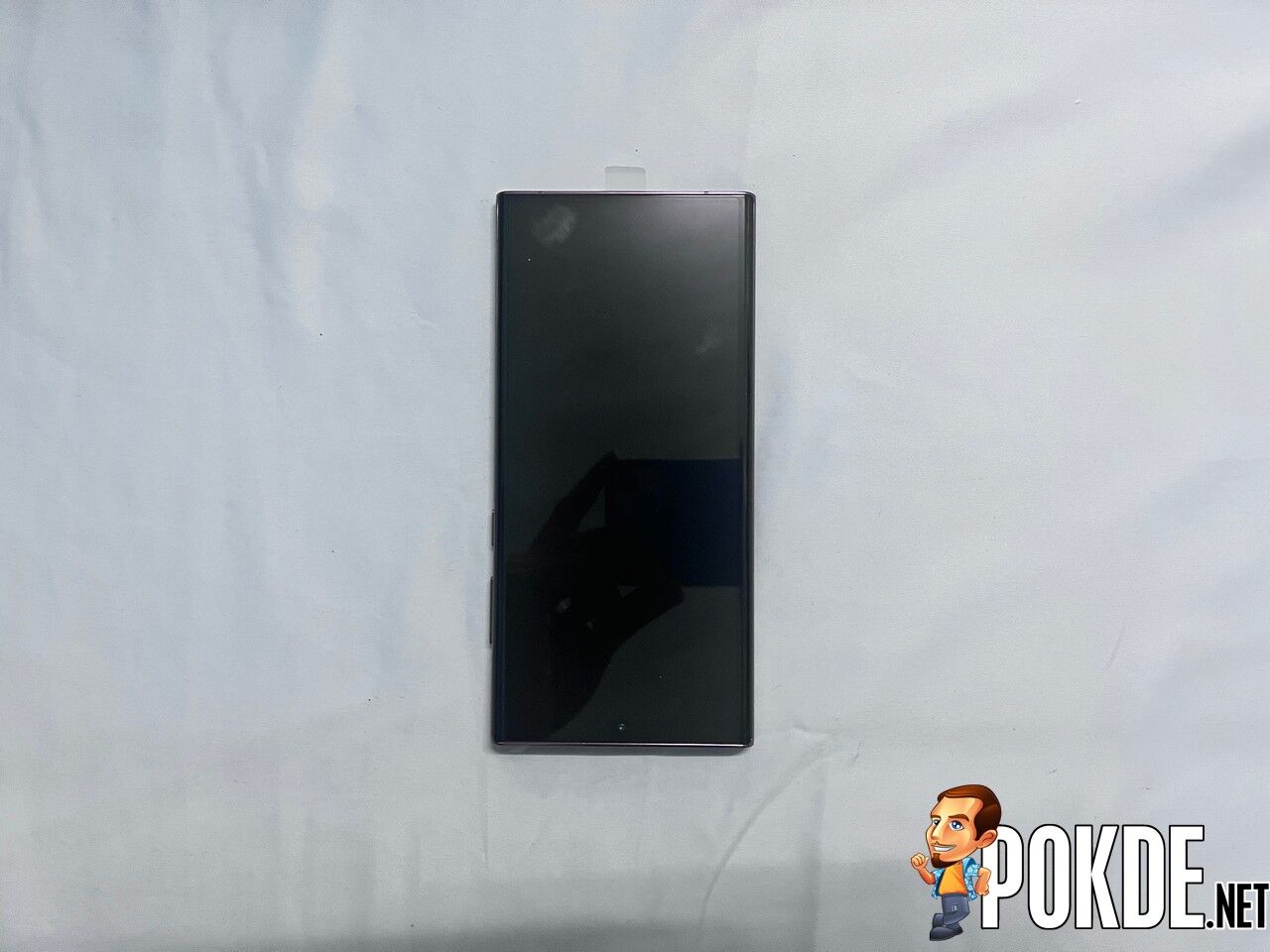
The Samsung Galaxy S22 Ultra looks vastly different from its predecessor as it’s essentially the spiritual successor of the Galaxy Note series. This is why it inherited the boxy design instead of having the usual rounded edges known from the Galaxy S series. You get a 6.8-inch QHD+ Dynamic AMOLED 2X display with adaptive refresh rate ranging from 1Hz to 120Hz and ultra thin bezels. You get a punchhole cutout for the selfie camera here.

There’s nothing much to see on the left side but on the right side, you have the volume rockers and power button. On the top, you have a microphone hole residing in solitude while the bottom is where you can find the SIM card tray, USB-C port, a speaker grille, and the highly-requested S Pen slot. In case you’re wondering, this device has a stereo speaker setup, with the earpiece being the other speaker.

The rear has a matte finish, which is great because it’s not a fingerprint magnet and it’s easier to grip. Unlike previous years, the rear camera setup does not have a housing, so they protrude outwards individually. Apparently, this is done to help shave some weight off the device. I still dig the contour cut design from its predecessor, especially in two-toned colours and this one makes it look rather bare.
For our review unit, we received the Burgundy colour variant, which looks quite similar to the Mystic Bronze on the Galaxy Note 20 Ultra. Personally, this is one of two colour choices that I feel is the most attractive, right next to Green. While I would agree with the sentiment that this is essentially the Galaxy Note20 Ultra without the camera housing in terms of design, it’s a needed change not just to make sure the legacy lives on, but to have an Ultra variant that is actually noteworthy, no pun intended.
Specifications
| SoC | Snapdragon 8 Gen 1, 4nm 1 x Cortex-X2 @ 3 GHz + 3 x Cortex-A710 @ 2.5GHz + 4 x Cortex-A510 @ 1.8 GHz Adreno 730 GPU |
|
| RAM | 8GB | |
| Storage | 128GB UFS 3.1 | |
| Display | 6.8″ QHD+ (3080 x 1440) Dynamic AMOLED 2X Display Corning Gorilla Glass Victus+ HDR10+ 1750 nits 1Hz to 120Hz Adaptive Refresh Rate |
|
| Rear Camera | 108MP f/1.8 wide angle camera, PDAF, Laser AF, OIS 10MP f/4.9 telephoto camera, 10x optical zoom, dual pixel PDAF, OIS 10MP f/2.4 telephoto camera, 3x optical zoom, dual pixel PDAF, OIS 12MP f/2.2 120˚ ultra-wide, dual pixel PDAF, Super Steady video LED flash, auto-HDR, panorama 8K@24fps, 4K@30/60fps, 1080p@30/60/240fps, 720p@960fps, HDR10+, stereo sound rec., gyro-EIS |
|
| Selfie Camera | 40MP f/2.2 80˚ wide-angle selfie cam, PDAF Dual video call, Auto HDR 4K@30/60fps, 1080p@30fps |
|
| Battery | 5000mAh 45W fast charging USB-PD 3.0 fast charging 15W wireless fast charging 4.5W reverse wireless charging |
|
| Dimensions | 163.3 x 77.9 x 8.9 mm 229g |
|
| Ingress Protection | IP68 | |
| Software | One UI 4.1 based on Android 12 | |
| Colours | Phantom Black, Phantom Silver, Green, and Burgundy | |
Performance

Starting off with Antutu V9, the Samsung Galaxy S22 Ultra has a very strong showing thanks to the Snapdragon 8 Gen 1 SoC. Sure, the Plus variant had a higher score but the difference is so small, it’s negligible, and both devices are using the same chip anyway. It’s definitely a step ahead of last year’s flagship chip, the Snapdragon 888.

In Geekbench 5 however, it’s different as the scores seem to be about on par with Snapdragon 888 devices. Regardless, the Apple A15 Bionic chip in the iPhone 13 is significantly stronger. However, that doesn’t mean that the Samsung Galaxy S22 Ultra is weak as that is still a very strong showing.


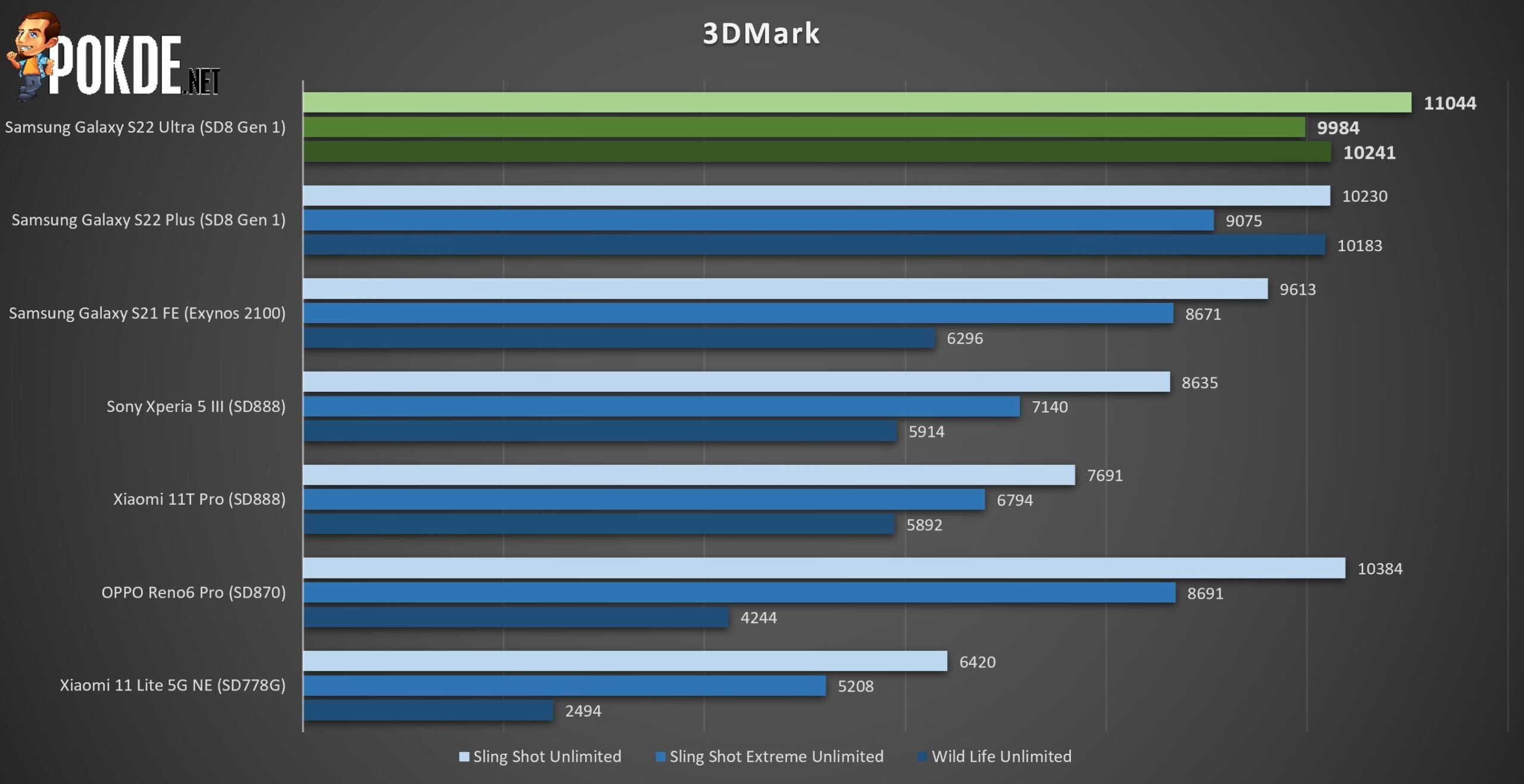
Moving on to 3DMark, it’s interesting to see that the Samsung Galaxy S22 Ultra outperforms the Plus variant by a small yet noticeable margin. This is likely due to a better cooling system inside the Ultra rather than the performance on its own. It certainly took the top spot with ease here.

As for PCMark’s Work 3.0 benchmark, the results were surprising to say the least. I expected it to outperform the Snapdragon 888, which it did for some devices, but it also lost out to some as well. Regardless, it’s still a respectable score nonetheless, and it’s more than enough to serve anyone in their day-to-day use.

If you’re curious about the battery life, the Samsung Galaxy S22 Ultra manage to last a healthy 10 hours and 1 minute (601 minutes) in PCMark Work 3.0 endurance test before it died out. This is done on the adaptive refresh rate setting, as it’s the best and likely option that most consumers will be using since it provides the smoothest display with most efficient battery life. As for personal use, I can get two days with light to medium use, and a full day if I were to play mobile games on it (Another Eden and Apex Legends Mobile).
As for charging speed, the Samsung Galaxy S22 Ultra does support the faster 45W charging speed. From 1% battery, I get the following results:
- 15 minutes = 38%
- 30 minutes = 69%
- 45 minutes = 85%
- Full charge = 58 minutes
If you want to compare it with last year’s Galaxy S21 Ultra, click right here.
User Experience

The Samsung Galaxy S22 Ultra uses a 6.8-inch QHD+ Dynamic AMOLED 2X display with adaptive refresh rate from 1Hz to 120Hz. With the exception of a slight size difference, it’s pretty similar to its predecessor as it’s capable of displaying excellent colours with good dynamic range and contrast. It still uses the same punchhole camera cutout and the screen is bright enough to be easily used under direct sunlight, peaking at 1750 nits just like the Ultra variant.

Once again, adaptive refresh rate is here and it goes from 48Hz to 120Hz, which is great because you can enjoy buttery smooth transitions and it will cut it down when it’s not needed so you can save on battery life. You also have Gorilla Glass Victus+ for added protection. Apart from that, the display features Eye Comfort Shield which is said to reduce strain and fatigue with reduced blue light emissions.
Like its predecessor, the Samsung Galaxy S22 Plus has a matte finish, which means that it’s a lot less susceptible to fingerprints. Interestingly, it does have feel like the build quality has been improved as it feels more solid than its predecessor. Once again, it’s a shame that the two-toned look has gone away in this iteration but then again, the matter of liking this or not is subjective so that’s fine.

The Samsung Galaxy S22 Plus is running One UI 4.1 based on Android 12. For the most part, it doesn’t look different from the previous version but it does introduce a slew of new updates. This includes an improved RAM Plus that lets you go past the 4GB limit up to 8GB, adding virtual RAM using your internal storage. Apart from that, the native calendar sees the addition of smart features and there’s better integration with Microsoft apps. Generally, you can expect a better, richer experience compared to before while still retaining its smooth, user-friend user experience.
Gone are the days of the slow under-display fingerprint scanners from the 20-series as the Samsung Galaxy S22 Plus essentially solidified its speed and accuracy. It’s fast, reliable, and generally problem-free as I’ve yet to face a single failed reading of my fingerprint except when my hands are wet, which is to be expected.

While using the smartphone, the Samsung Galaxy S22 Plus can get hot at certain times, such as when during initial setup, using the camera extensively, and playing mobile games. That being said, it seems to be lesser after about a week of using, which I find odd at first. I believe this is the AI technology working behind the scenes to optimize the device. Regardless, do expect some heat while using this for the more intensive tasks as the Snapdragon 8 Gen 1 is known for some thermal issues.
S Pen

While its predecessor did have the S Pen, the Samsung Galaxy S22 Ultra marks the first time we’re getting built-in S Pen since the end of the Galaxy Note series. At its core, you can use it as a digital pen if you want to quickly jot down notes, draw something, or even put down your signature.
Unlike the S21 Ultra, you can use it to navigate the smartphone and execute specific actions using Air Gestures. You simply need to hold the S Pen button and move it in a specific way. By default, these are the things you can do with the S Pen Air Gestures:

- Back: Exactly the same as the back button for Android devices.
- Home: Goes to your home screen.
- Recents: Opens the window displaying all your recently opened apps.
- Smart Select: Lets you capture a section of your screen to share in a screenshot or create an animated GIF.
- Screen Write: Takes a screenshot of what’s on display and lets you write on it. You can also share it from here afterwards.
You can customize the actions and disable specific gestures if you wish. You can also have it do specific things in apps. For example, it can act as a remote shutter for the camera app. It can take a while to get used to all the available features but once you do, it’s going to be hard to live without it. This alone makes this year’s Ultra model a very enticing device.
Camera

The native camera UI on the Samsung Galaxy S22 Ultra is essentially the same as recent Samsung devices. It’s simple to use but it still has all the advanced Pro features to make full use of the camera system. The app will also automatically optimize the shots you’re about to take based on what the AI understands the subject in frame.


The Samsung Galaxy S22 Ultra may be using the same camera hardware as the S21 Ultra but with the use of AI technology and other improvements, they really managed to bring a lot to the table. Stabilization has seen a huge improvement, a better separation of subject and background, and better low-light performance, Needless to say, pictures come out with excellent dynamic range, good subject exposure, and minimal noise at worst, with there being only a minor drop in quality for telephoto and ultrawide.
Samsung Galaxy S22 Ultra Verdict

In previous years, I would safely say that the Ultra variant can be skipped if you owned the Ultra model of the year prior. In the case of the Samsung Galaxy S22 Ultra, it’s actually worth upgrading over the Galaxy S21 Ultra for one simple reason; built-in S Pen with full functionalities. Sure, there are other upgrades as well but this is basically a brand new Galaxy Note, no matter what it’s called, and you still get to enjoy flagship hardware, cameras, a large vibrant display, and good battery life.
The only reason to avoid it is if the S Pen doesn’t matter much to you or if your lifestyle is already integrated into the Apple ecosystem. At the end of our Samsung Galaxy S22 Ultra review, I award this flagship smartphone with our coveted Gold Pokdeward.

Big thanks to Samsung Malaysia for sending us this smartphone for the purpose of this review.


